


Remove All Numbers (0-9)
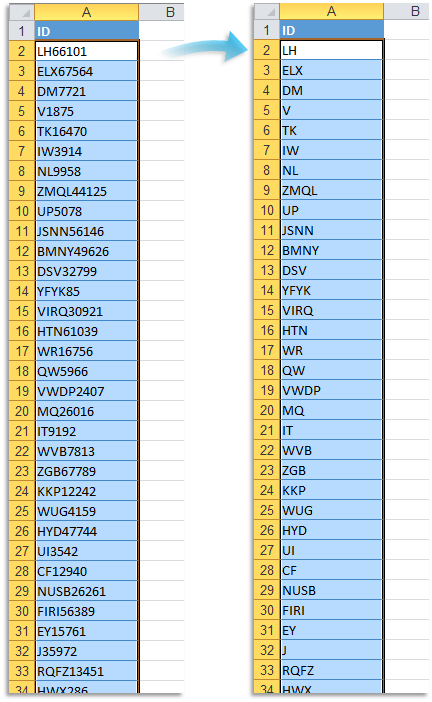
This tool removes all digits (0 through 9) from the values in your selected cells.
It works on plain text and is useful for cleaning up postal codes, employee IDs, product labels, or imported datasets that combine numbers with descriptive text.
For example:
- "75008 Paris" becomes " Paris"
- "325579 Jane Doe" becomes " Jane Doe"
- "804 Robson Street" becomes " Robson Street"
- "Invoice_1003" becomes "Invoice_"
- "Order #4567" becomes "Order #"
Cells that contain formulas or numeric values, such as numbers and dates, are left unchanged.
Note:
This tool only removes digits 0-9. It does not remove punctuation or symbols like decimal points, commas, or minus signs.
For example:
- "An average of 12.50" becomes "An average of ."
Tip:
If needed, you can use our "Remove Leading and Trailing Spaces" tool to clean up any leftover spaces.
Starting this tool
Click › Text › 18. Remove All Numbers (0-9)
Specify a Keyboard Shortcut: ASAP Utilities › My Tools & Shortcuts › Manage My Tools & Shortcuts...
Additional keywords to help you find this tool:
Remove numbers from text, Delete digits in Excel cells, Strip numbers from strings, Remove 0 to 9 in Excel, Remove numeric characters, Remove only digits, Remove numbers keep text, Remove numbers from postal codes, Delete numbers from imported data, Remove numeric part, Remove number characters, Erase digits from string, Remove all digits, Remove numbers from cell contents, Delete 0123456789 in Excel
Tip:Alt+P for the previous tool.
Tip: Alt+N for the next tool.

Save Time in Excel. The Easy Way.
ASAP Utilities helps you save time and do what Excel alone can't.
You can get started right away. No training needed.
Most users start with a few tools. Many end up using ASAP Utilities daily.
Used by teams in 28,500+ organizations.
Get Started with ASAP Utilities
Start saving time in Excel with practical tools you can use right away.
-
No sign-up required.
-
-
Free 90-day trial