


Remove Last X Characters...
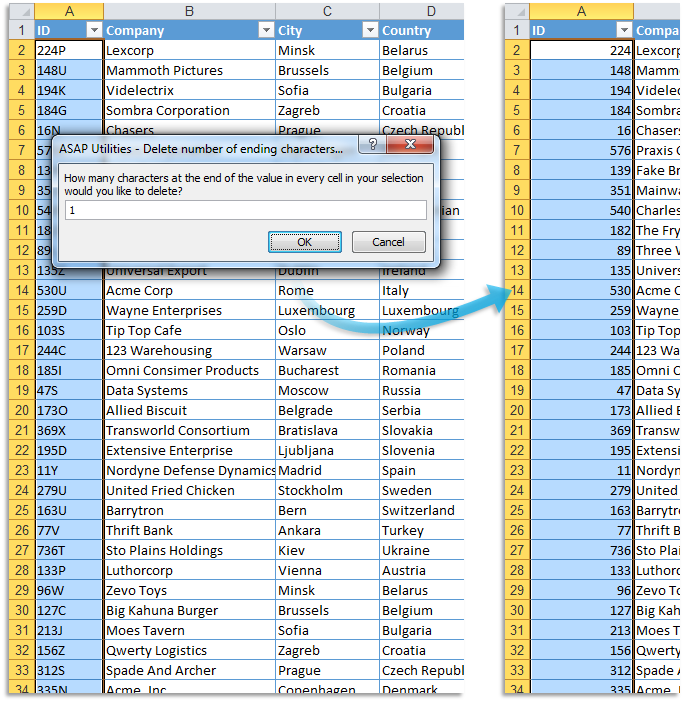
This tool removes a specified number of characters from the end of the selected Excel cells.
It's useful when cleaning up imported data and quickly removing suffixes, trailing codes, or extra characters from values such as product IDs, file names, serial numbers, or labels.
It works with both text and numbers.
Formulas are replaced with their calculated values before processing.
Cells that contain dates are skipped.
Examples where you specified to remove the last X characters:
- "IMG_00321.jpg" → "IMG_00321" (removed 4 characters)
- "Sales_Jan_Report_v5" → "Sales_Jan_Report" (removed 3 characters)
- "8012 WT" → "8012" (removed 3 characters)
- "Invoice_12345_copy" → "Invoice_12345" (removed 5 characters)
Unlike Excel's LEFT, MID, or RIGHT functions, this tool offers a fast, one-click solution without formulas.
Starting this tool
Click › Text › 21. Remove Last X Characters...
Specify a Keyboard Shortcut: ASAP Utilities › My Tools & Shortcuts › Manage My Tools & Shortcuts...
Additional keywords to help you find this tool:
Remove last characters, Delete characters at end of cell, Truncate text, Remove suffix from cell, Cut off end of text, Remove ending characters, Trim text at the end, Remove file extension, Remove last X characters, Delete trailing text, Remove trailing characters, Remove last letters or digits, Delete fixed number of characters at end, Crop end of string, Trim suffix from data, Remove ending string from cell
Tip:Alt+P for the previous tool.
Tip: Alt+N for the next tool.

Save Time in Excel. The Easy Way.
ASAP Utilities helps you save time and do what Excel alone can't.
You can get started right away. No training needed.
Most users start with a few tools. Many end up using ASAP Utilities daily.
Used by teams in 28,500+ organizations.
Get Started with ASAP Utilities
Start saving time in Excel with practical tools you can use right away.
-
No sign-up required.
-
-
Free 90-day trial