


Keep Only the First X Characters...
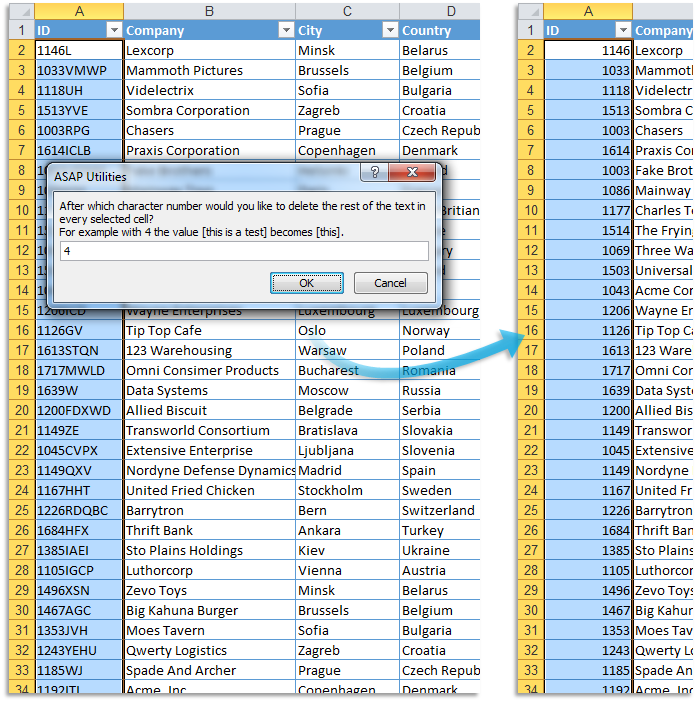
This tool removes all characters that come after a specified number of characters in the selected Excel cells.
Only the first X characters are kept.
It is helpful for shortening values to a fixed length, such as trimming IDs, codes, or names.
It works with both text and numbers.
Formulas are replaced with their calculated values before processing.
Cells that contain dates are skipped.
Examples where you kept only the first X characters:
- "75008 Paris" → "75008" (kept first 5 characters)
- "EMP001234" → "EMP" (kept first 3 characters)
- "FR-2024-INV123" → "FR" (kept first 2 characters)
- "NL91ABNA0417164300" → "NL91" (kept first 4 characters, IBAN)
- "4111 1111 1111 1234" → "4111" (kept first 4 characters, credit card)
You can use this as a quick alternative to Excel's =LEFT() function without using formulas.
Starting this tool
Specify a Keyboard Shortcut: ASAP Utilities › My Tools & Shortcuts › Manage My Tools & Shortcuts...
Additional keywords to help you find this tool:
Keep first X characters, Truncate text to fixed length, Remove after X characters, Trim after certain length, Shorten cell content, Keep only beginning of text, Cut off text after X characters, Remove everything after position, Truncate strings, Keep first part of string, Trim string by character count, Limit cell text length, Keep leftmost characters, Remove text after certain length, Excel LEFT function alternative, Cut text after certain number of characters, Clean up long codes or IDs, Remove characters after length, Shorten imported text values
Tip:Alt+P for the previous tool.
Tip: Alt+N for the next tool.

Save Time in Excel. The Easy Way.
ASAP Utilities helps you save time and do what Excel alone can't.
You can get started right away. No training needed.
Most users start with a few tools. Many end up using ASAP Utilities daily.
Used by teams in 28,500+ organizations.
Get Started with ASAP Utilities
Start saving time in Excel with practical tools you can use right away.
-
No sign-up required.
-
-
Free 90-day trial