


Reverse Text
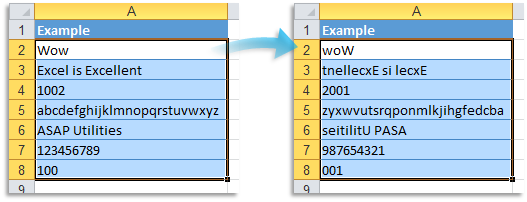
This tool returns a string in which the character order of each selected cell's content is reversed.
It works with both text and numbers.
Formulas are replaced with their calculated values before processing.
Cells that contain dates are skipped.
Examples:
- "Excel" becomes "lecxE"
- "123456" becomes "654321"
- "AB-123" becomes "321-BA"
Reversing text can help fix data that was stored or exported in reverse order, convert reversed IDs or codes back to readable format, or prepare mirrored text for labels or printing.
It's also useful in testing scenarios and creative applications like puzzles or quizzes.
Starting this tool
Click › Text › 26. Reverse Text
Specify a Keyboard Shortcut: ASAP Utilities › My Tools & Shortcuts › Manage My Tools & Shortcuts...
Additional keywords to help you find this tool:
Reverse string, Flip text, Reverse cell content, Reverse characters, Flip text backwards, Reverse order of text, Reverse values in Excel cells, Mirror text, Invert text, Excel reverse code or ID, Reverse alphanumeric string, Text reversal tool, Swap character order
Tip:Alt+P for the previous tool.
Tip: Alt+N for the next tool.

Save Time in Excel. The Easy Way.
ASAP Utilities helps you save time and do what Excel alone can't.
You can get started right away. No training needed.
Most users start with a few tools. Many end up using ASAP Utilities daily.
Used by teams in 28,500+ organizations.
Get Started with ASAP Utilities
Start saving time in Excel with practical tools you can use right away.
-
No sign-up required.
-
-
Free 90-day trial