


根据所选单元格中的值轻松创建多个文件夹...
ASAP Utilities › 文件与系统 › 25. 根据所选单元格中的值轻松创建多个文件夹...
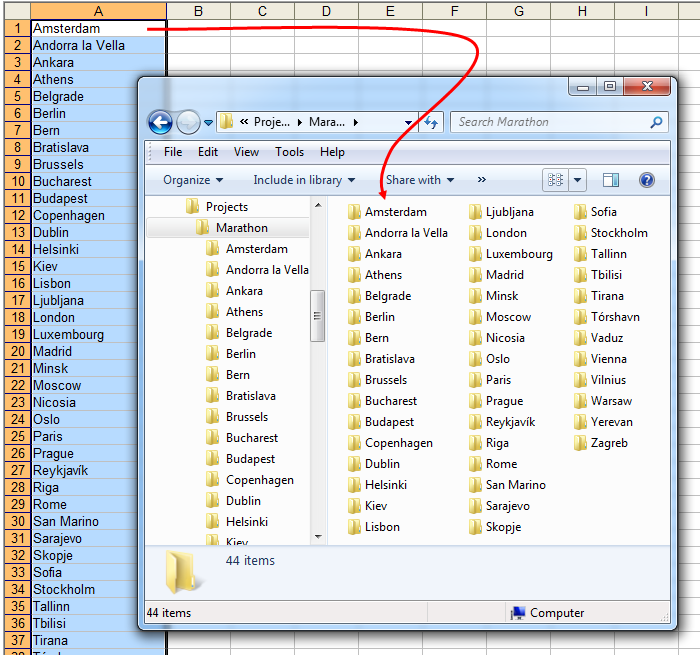
通过此实用工具,您可以根据单元格内容轻松创建多个文件夹。
该实用工具会要求您选取文件夹。在此文件夹中,它会为您的选定区域中每个单元格创建一个新文件夹,并使用单元格中的值作为文件夹名称。
Starting this tool
Click › 文件与系统 › 25. 根据所选单元格中的值轻松创建多个文件夹...
Specify a Keyboard Shortcut: ASAP Utilities › My Tools & Shortcuts › Manage My Tools & Shortcuts...
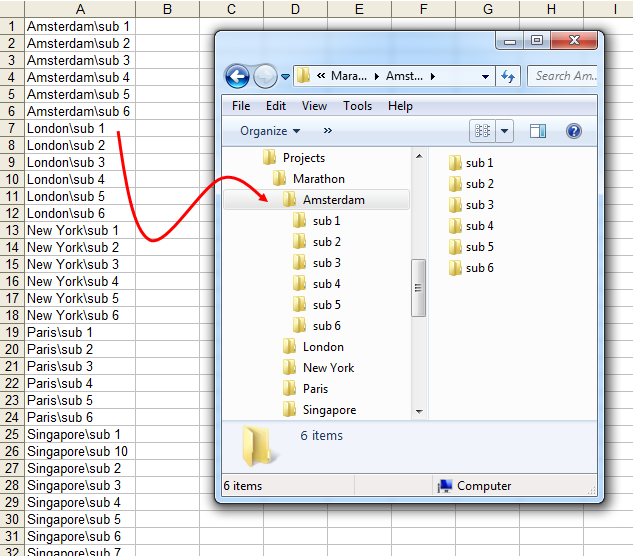
Example screenshot: 2 Create folders and subfolders by using the backslash character in the cells (Here's the English version.)
帮助您找到此工具的更多关键词:
目录, 路径
提示:Alt+P 打开上一个工具。
提示:Alt+N 打开下一个工具。

许多 Excel 用户希望 Excel 内置的实用工具
节省 Excel 工作时间,简单高效。
ASAP Utilities 帮助您节省时间,并实现 Excel 本身无法完成的操作。
您可以立即开始使用,无需培训。
大多数用户都会先从几个工具开始。 很多用户后来都会每天使用 ASAP Utilities。
已被超过28,500家组织采用。