


将公式中使用的区域名称替换为其单元格引用(在选定工作表上)
ASAP Utilities › 区域 › 24. 将公式中使用的区域名称替换为其单元格引用(在选定工作表上)
此实用工具会将选定工作表中的公式中使用的区域名称替换为其单元格引用。
例如,如果您在单元格 C10 中的值的区域名称为 'quantity',您使用了一个公式,比如 '=A1*quantity',则此实用工具会将该公式替换为 '=A1*C10'。
如何启动此工具
指定键盘快捷方式: ASAP Utilities › 我的工具和快捷键 › 管理我的工具和快捷键...
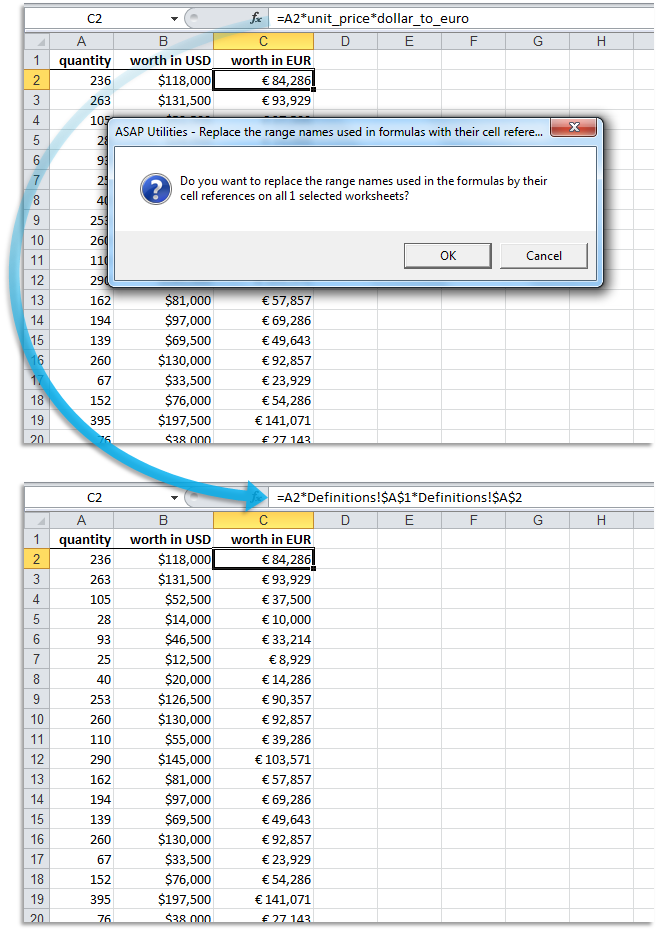
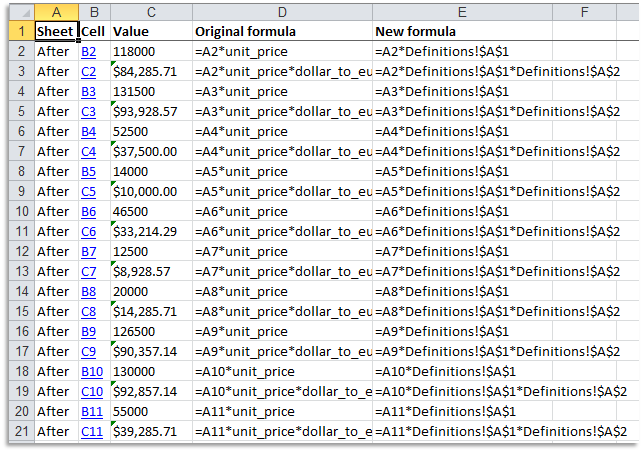
屏幕截图示例: 2 A report with the changes that were made (此处是英文版本。)
提示:Alt+P 打开上一个工具。
提示:Alt+N 打开下一个工具。