


舍入数字(不是格式设置,而是更改)...
ASAP Utilities › 数字与日期 › 11. 舍入数字(不是格式设置,而是更改)...
此实用工具会将所选单元格中的数字替换为舍入值。
此工具不是使用单元格格式设置来舍入数字,实际上是更改单元格中的值。
该实用工具会要求您提供一个数字来指定如何舍入,类似于 Excel 的 =ROUND() 函数:
- 正数: 将数字舍入到指定位数。
- 零: 将值舍入到最接近的整数。
- 负数: 数字将舍入到小数点左侧某个位数,例如,舍入到十位、百位、千位等。
例如,含有值 105.326 的单元格舍入到 1,则将变为 105.3;舍入到 0,则将变为 105;舍入到 -1,则将变为 110。
Starting this tool
Click › 数字与日期 › 11. 舍入数字(不是格式设置,而是更改)...
Specify a Keyboard Shortcut: ASAP Utilities › My Tools & Shortcuts › Manage My Tools & Shortcuts...
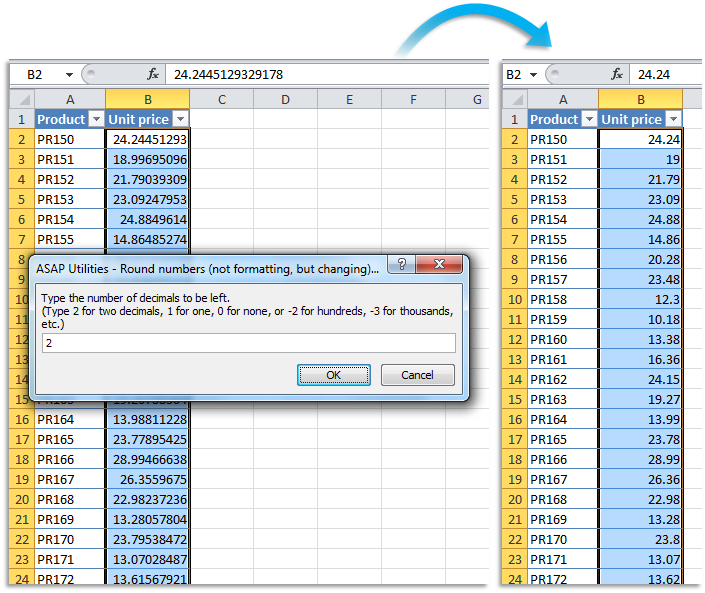
Example screenshot: B Round the selected numbers to the nearest integer (zero decimal places) (Here's the English version.)
.png "B Round the selected numbers to the nearest integer (zero decimal places) (Here's the English version.)")
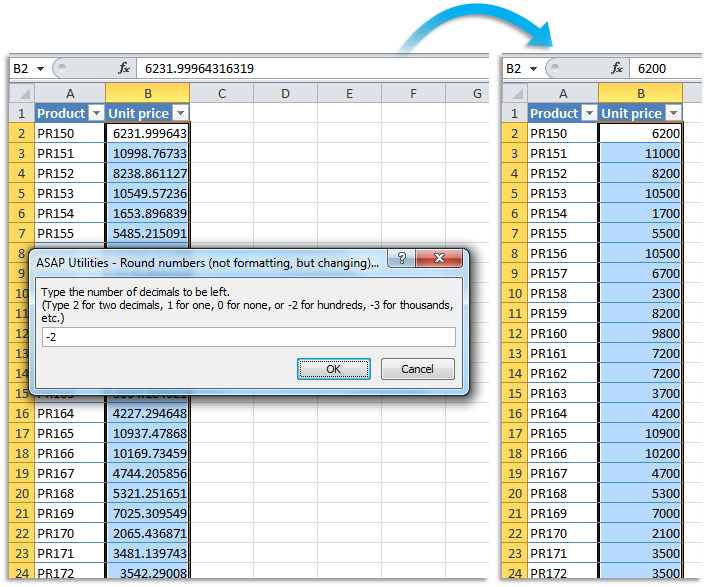
Example screenshot: C Round the selected numbers to the nearest multiple of 100 (Here's the English version.)
帮助您找到此工具的更多关键词:
限制小数点后面的数字位数
提示:Alt+P 打开上一个工具。
提示:Alt+N 打开下一个工具。

许多 Excel 用户希望 Excel 内置的实用工具
节省 Excel 工作时间,简单高效。
ASAP Utilities 帮助您节省时间,并实现 Excel 本身无法完成的操作。
您可以立即开始使用,无需培训。
大多数用户都会先从几个工具开始。 很多用户后来都会每天使用 ASAP Utilities。
已被超过28,500家组织采用。