Jeremy (US) asked me a question about coloring based on a cells value:
First your product ASAP Utilities is great and has been a life saver. One feature that would be outstanding is a conditional row color based on a cell value.
For instance there are numerous times I have to color a row because the value of a cell in a column is set either TRUE of FALSE or 0 or 1 and I currently do this by hand review.
If the ASAP utilities has a way to do this already I would love to know how.
Excel has a great built-in function to achieve this: Conditional Formatting (In the menu Format » Conditional formatting). The first time it might be a little difficult to find your way to do this but if you spend a little time with it you will soon realize it is powerful function.
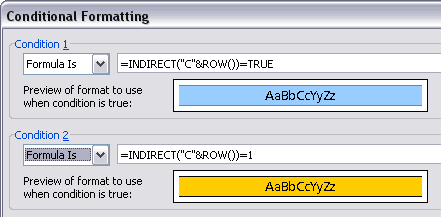
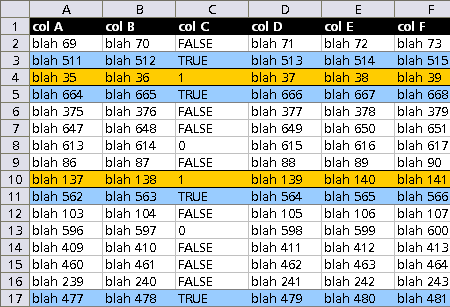
In the following example if we want the rows to be colored blue when column C is true and orange if the value is 1, we can use the following formula's:
Select all the cells that need to be colored. Usually we color a cell based an its value and use the [Cell Value Is ] in the conditional formatting box. To format cells based on other cells you need the [Cell Formula Is].
We use the =INDIRECT() function to get the value of column C for each row:
If the value is TRUE : =INDIRECT("C"&ROW())=TRUE
If the value is 1 : =INDIRECT("C"&ROW())=1
The result:
Download the example workbook
Interesting links:
http://www.cpearson.com/excel/cformatting.htm
http://www.contextures.com/xlCondFormat01.html
A "quick and dirty" method is using:
ASAP Utilities » Select » Conditional row and column select, hide or delete
and then color the selected rows.