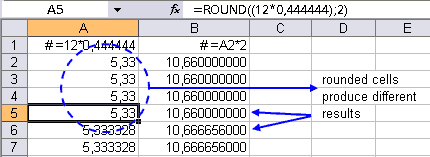
I just got a call from a friend of mine. He needed to edit a spreadsheet and round a bunch of formulas. Since the rounding is important for the calculations, a simple cell-formatting wouldn't do.
Excel's worksheet function =ROUND() can be used to round the numbers. However editing a lot of cells by hand (especially with a lot of different formulas that can't be copied) can be time consuming. So I wrote a little routine for it he can use the next time:
Sub BuildRoundFormula()
  ' Build the =ROUND() function around the formulas
  ' in your selection

  Dim rngCel             As Range
  Dim strFormula         As String
  Dim lNumDigits         As Long
  lNumDigits = 2            ' < --- EDIT THIS

  ' If lNumDigits is greater than 0 (zero), then number
  ' is rounded to the specified number of decimal places.
  ' If lNumDigits is 0, then number is rounded to the
  ' nearest integer.
  ' If lNumDigits is less than 0, then number is rounded
  ' to the left of the decimal point.

  For Each rngCel In Selection
    If rngCel.HasFormula Then
      strFormula = rngCel.Formula
      ' strip the equal sign on the left:
      strFormula = Right(strFormula, Len(strFormula) - 1)
      rngCel.Formula = "=ROUND((" & strFormula & ")," & _
                       lNumDigits & ")"
    End If
  Next
End Sub
By changing the value of the variable lNumDigits you can specify the number of decimals or digits.
If you're a little handy with macro's you can use this procedure as a start to apply other functions.