


此页面目前仅提供英文版本。
Pre-release: ASAP Utilities 9.3 - Switch Back to Previous Sheet
April 30, 2026
Quickly return to the sheet you used last and go back and forth with ease
We're happy to share a well-tested pre-release of the next version of ASAP Utilities, now available to download and try. It includes a small but very useful new feature: Switch Back to Previous Sheet.
This feature was added based on how many of you work with multiple sheets.
Quickly switch between two sheets
This tool lets you quickly switch between your current sheet and the one you used last.
Use it again to return, so you can easily go back and forth between two sheets.
Work faster without moving through tabs
This is especially helpful when working with many sheets or when comparing data across sheets. Instead of moving through tabs one by one using Ctrl+Page Up or Ctrl+Page Down, you can instantly return to where you were, even if the sheets are not next to each other or are in different workbooks.
It works like Alt+Tab, but for sheets.
Works across sheets workbooks
You can use it on worksheets and chart sheets, even when they are in different workbooks.
Start it with a shortcut or from the menu
You can launch it using the newControl+Alt+L shortcut, or find it in the menu as shown below:
Sheets > Switch Back to Previous Sheet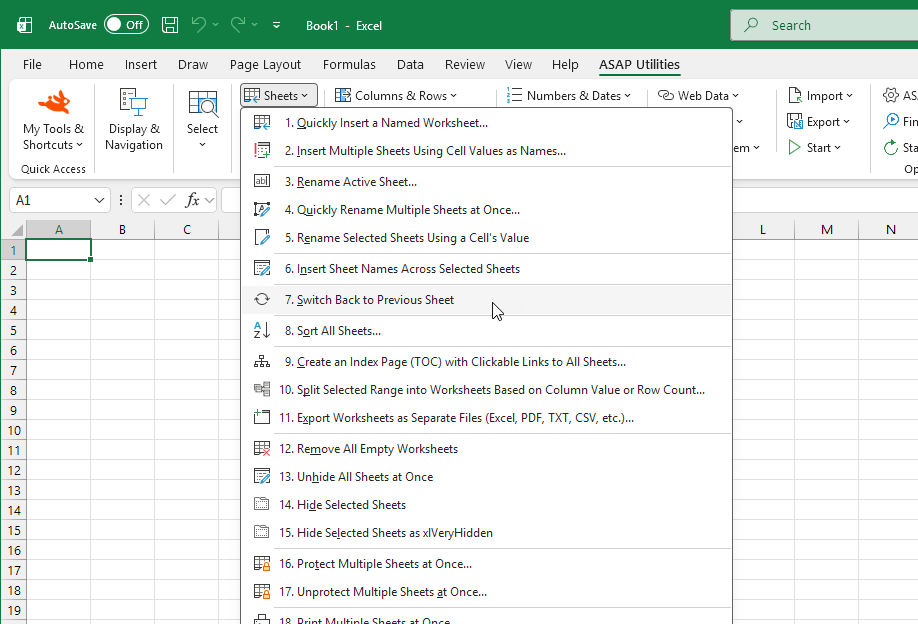
Download and try the pre-release
Download the pre-release and try the new Switch Back to Previous Sheet feature today.
We'd love to hear your feedback.
Download the pre-release and read more details
Stay informed about new releases and important updates
Subscribe to our newsletter (in English)