


Version 8.0.2 - November 10, 2022
October 13, 2022
Finished
On November 10, 2022 the new version 8.0.2 has been released. Download
Supported Excel versions
ASAP Utilities 8.0 works with:
- Excel 365 (both 32- and 64-bit version)
- Excel 2021 (both 32- and 64-bit version)
- Excel 2019 (both 32- and 64-bit version)
- Excel 2016 (both 32- and 64-bit version)
- Excel 2013 (both 32- and 64-bit version)
- Excel 2010 (both 32- and 64-bit version)
On any Windows system that matches the Excel system requirements.
Free upgrade if you purchased version 7.x
If you purchased a license in 2016 or later (version 7.x) then you get version 8 free of charge. You can use the same license details.
If you purchased a license in 2015 or longer ago, then please contact us for a 50% discount to upgrade to version 8.
To upgrade to a newer version of ASAP Utilities that is covered by your license, just install the new version "on top" of the existing version on your computer.
ASAP Utilities will then automatically recognize your settings and license information if you have already entered that previously.
New/improved in 8.0.2
- Range › Sort values inside each cell in selection...
Now supports the sorting of Unicode text if you have Excel 2021 or Excel 365. - General
A few visual improvements. - Speed
Improved speed when certain quirks of Excel 365 could have caused delays.
Bug fixes in 8.0.2
- Range › Sort values inside each cell in selection...
Your last used settings weren't rememberd and the 'semicolon' option didn't work. This is now fixed. - =ASAPEXTRACTFILENAME()
Starting from version 8.0, if a single value or cell was chosen, then this function returned the path + filename instead of just the filename. This is now fixed. - General
Fixed some other known issues.
New/improved in 8.0.1
A few small improvements in terms of text and display.
New/improved in 8.0
Tip of the day - Discover more features
By request, a daily tip to get to know ASAP Utilities better.
ASAP Utilities contains an incredible amount of small handy tools and it might be hard to remember them all.
Each day we show you a handy tool that you may have forgotten about or never knew existed.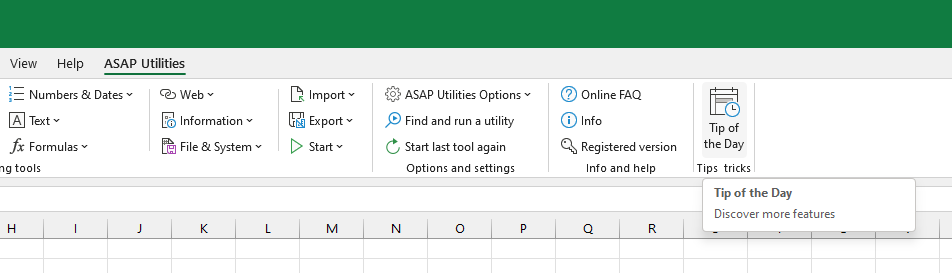
Count duplicates and give each set of duplicates its own color
Improved. Better distinctive colors and use of patterns are used.
This allows now to identify up to 264 sets of duplicated values with unique colors.
(In case more sets of duplicates are found, those remaining sets of duplicates are filled with the same color.)
Find and run a utility...
Upon request you can now toggle between showing the full descriptions or not. The advantage is that the list of tools found is quicker to scroll through without the descriptions.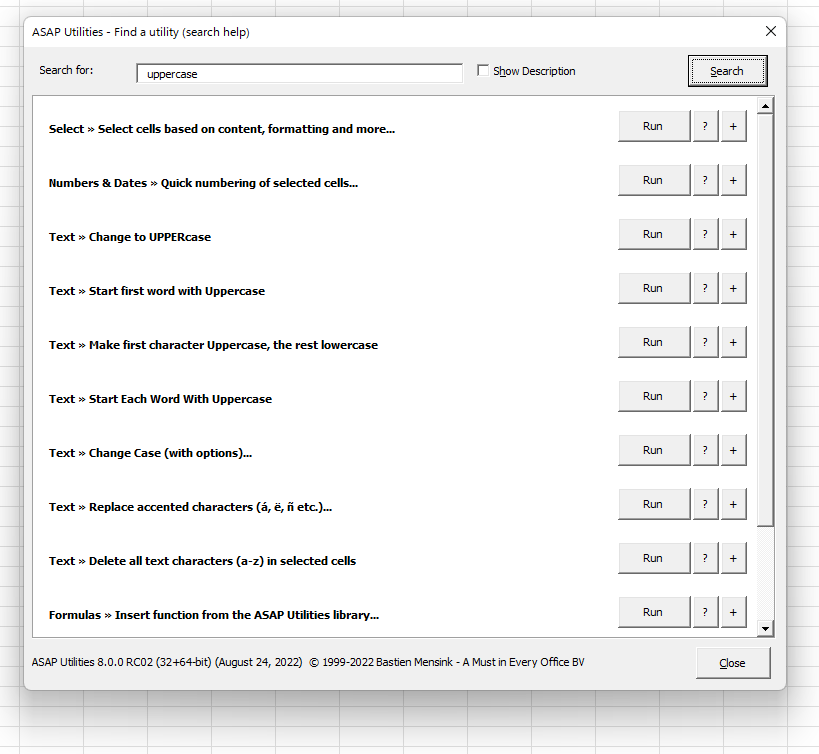
New worksheet function
=ASAPGETINDENTLEVEL(cell)
Returns the indent level for the cell.
If you afterwards change the indent level in any of the referenced cells, you have to press Control+Alt+F9 to have the formulas recalculated.
Parameters:
# cell = The cell to get the indent level from.
Updated worksheet function
=ASAPEXTRACTNUMBERS(text, optional strip_leading_zeros)
New optional parameter; strip_leading_zeros
If TRUE and the result is a number with one or more leading zeros, then those leading zeros will be removed. Default is FALSE.
Example:
=ASAPEXTRACTNUMBERS("0ADSKP783A") = 0783
=ASAPEXTRACTNUMBERS("0ADSKP783A", FALSE) = 783
Parameters:
# text = The value or cell address from which you want to extract the numbers from.
# keep_leading_zeros = Optional. Preserve leading zeros. If omitted it is assumed to be TRUE.
Support for dynamic array formulas and spilling
The following functions can now also be used in dynamic array formulas and support spilling:
- ASAPCELLCOLORINDEX()
- ASAPCOUNTCHAR()
- ASAPEXTRACTFILENAME()
- ASAPEXTRACTFOLDERNAME()
- ASAPEXTRACTNUMBERS()
- ASAPFONTCOLORINDEX()
- ASAPGETCOMMENT()
- ASAPGETDOMAIN()
- ASAPGETFONTNAME()
- ASAPGETFONTSIZE()
- ASAPGETFORMULA()
- ASAPGETFORMULAINT()
- ASAPGETHYPERLINK()
- ASAPGETINDENTLEVEL
- ASAPGETNUMBERFORMAT()
- ASAPISBOLD()
- ASAPISFORMULA()
- ASAPSPELLNUMBER()
- ASAPSTRIPNUMBERS()
Useful links from Microsoft about Dynamic array formulas:
- Microsoft: Excel functions that return ranges or arrays
https://support.microsoft.com/en-us/office/excel-functions-that-return-ranges-or-arrays-7d1970e2-cbaa-4279-b59c-b9dd3900fc69 - Microsoft: Dynamic array formulas and spilled array behavior
https://support.microsoft.com/en-us/office/dynamic-array-formulas-and-spilled-array-behavior-205c6b06-03ba-4151-89a1-87a7eb36e531 - Microsoft: Dynamic array formulas vs. legacy CSE array formulas
https://support.microsoft.com/en-us/office/dynamic-array-formulas-vs-legacy-cse-array-formulas-ca421f1b-fbb2-4c99-9924-df571bd4f1b4 - Microsoft: Dynamic array formulas in non-dynamic aware Excel
https://support.microsoft.com/en-us/office/dynamic-array-formulas-in-non-dynamic-aware-excel-696e164e-306b-4282-ae9d-aa88f5502fa2
Worksheet functions support conditional applied formatting
The following functions now support/read formatting applied via conditional formatting:
- ASAPCELLCOLORINDEX()
- ASAPCOUNTBYCELLCOLOR()
- ASAPCOUNTBYFONTCOLOR()
- ASAPCOUNTSHADES()
- ASAPFONTCOLORINDEX()
- ASAPISBOLD()
- ASAPSUMBYCELLCOLOR()
- ASAPSUMBYFONTCOLOR
Select all shapes within the selected range
Selects all shapes that are inside or touch the selected range. Both visible and hiddens shapes will be selected.
via ASAP Utilities Options › 11. New tools in development (English only)
Clear Pivot Tables cache and refresh
Clears the cache from the pivot tables on the current worksheet or in the entire workbook.
via ASAP Utilities Options › 11. New tools in development (English only)
General
- Many (smaller but important) improvements.
- By request; the license info screen now contains a button to remove the license.
Minimum supported Excel version is 2010
Starting from version 8, ASAP Utilities requires at least Excel 2010, but we recommend to use at least Excel 2013 because that is still updated by Microsoft.
For many years already Microsoft no longer supports old Excel versions. By using such an old Excel version you could expose yourself to serious and potentially harmful security risks that may be in those old Excel versions.
Currently the oldest version of Excel that Microsoft still updates is Excel 2013.
Get Started with ASAP Utilities 9
Start saving time in Excel with practical tools you can use right away.
-
No sign-up required.
-
-
Free 90-day trial