


Tip of the Day | June 15, 2026
Discover new tools to get things done.
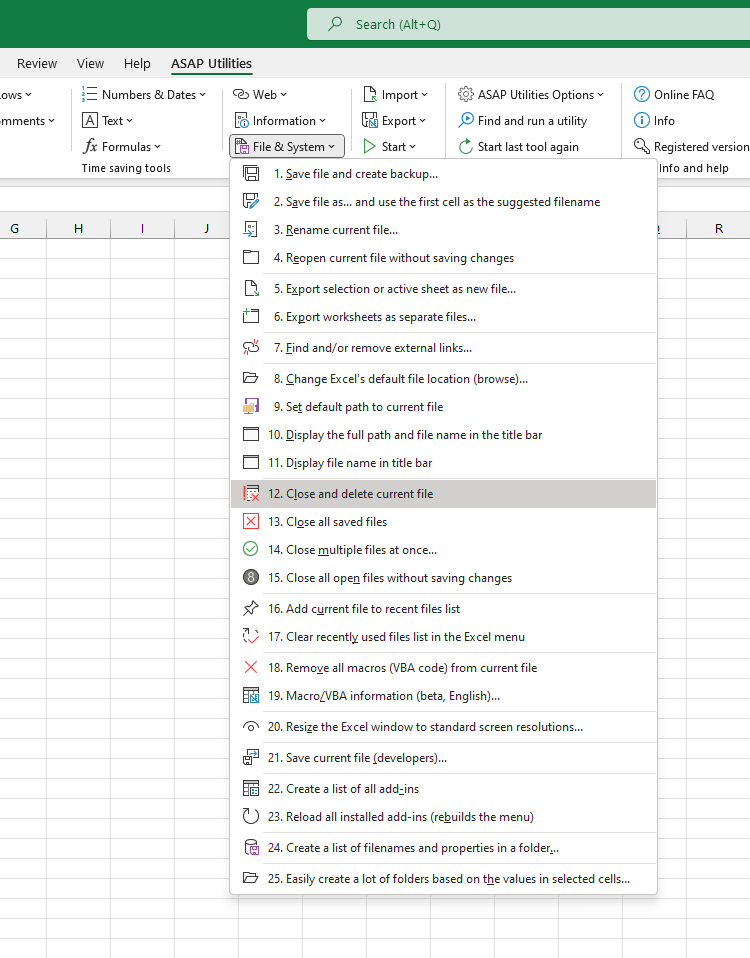
Close and Delete Current File
This tool closes your current file and deletes it from your computer.
You'll always get a confirmation prompt before the file is deleted, to help prevent accidental mistakes.
It's a quick way to remove a file you no longer need, without manually closing it first and then finding and deleting the file in File Explorer.
How it works:
- The current file is closed.
- If possible, the file is moved to your Recycle Bin (so you can restore it later if needed).
- If moving to the Recycle Bin isn't possible (for example, on a network drive), you'll be asked if you want to delete the file permanently.
It's useful when:
- Cleaning up temporary or test files
- Removing outdated files after saving a newer version
- Quickly deleting a file you no longer need directly from Excel
Starting this tool
Specify a Keyboard Shortcut: ASAP Utilities › My Tools & Shortcuts › Manage My Tools & Shortcuts...
Tip:Alt+P for the previous tool.
Tip: Alt+N for the next tool.