


Apply Calculation to Selected Cells...
This tool lets you quickly perform a calculation on a selected range without adding extra columns.
For example, you can multiply all cells in your selection by 10 instantly.
This tool supports various arithmetic operations, making it ideal for tasks such as unit conversions.
You can also include cell references or functions in your calculation. For example, if a cell contains the value 100 and you enter '+SUM(G20:G40)', the cell's formula becomes =(100)+SUM(G20:G40).
You can enter many types of formulas, such as '/1000', '+50', '*2,54', '*A1', etc.
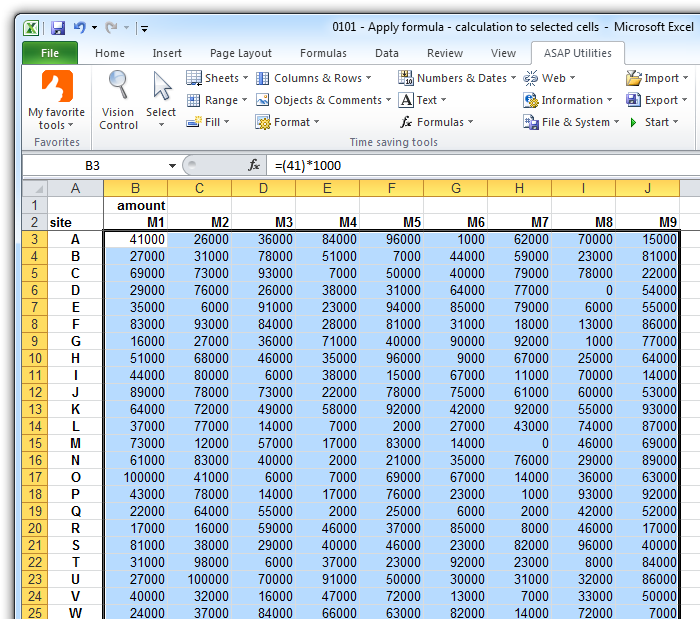
A formula is built around the original value or formula in each cell. For instance, if a cell contains the value 25 and you apply a division by 100, the result becomes =(25)/100. The tool applies the new calculation only to cells with valid data, ignoring empty cells, text, errors, or array formulas. If the new formula would result in an error, you will be warned upfront and no changes will be made.
Users of non-English versions of Excel can type arithmetic operations in their local language. For example, in the Dutch version of Excel, you can use a comma as the decimal separator and the localized function names, such as SOM() instead of the English SUM().
This tool remembers the last 100 calculations for easy reuse.
By default, you can launch this tool using the Control+Alt+I shortcut.
Starting this tool
Specify a Keyboard Shortcut: ASAP Utilities › My Tools & Shortcuts › Manage My Tools & Shortcuts...
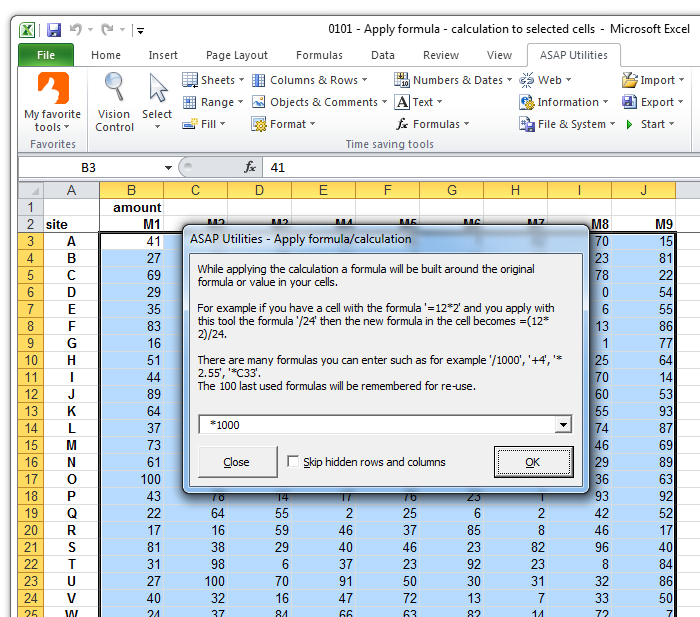
Example screenshot: 2 The result (Here's the English version.)
Additional keywords to help you find this tool:
Apply calculation to selected cells, Perform arithmetic on selected cells in Excel, Batch calculation, Quick formula application, Calculate on a selected range, Excel unit conversion tool, Apply arithmetic operations to cells, Currency conversion
Tip:Alt+P for the previous tool.
Tip: Alt+N for the next tool.

Save Time in Excel. The Easy Way.
ASAP Utilities helps you save time and do what Excel alone can't.
You can get started right away. No training needed.
Most users start with a few tools. Many end up using ASAP Utilities daily.
Used by teams in 28,500+ organizations.
Get Started with ASAP Utilities
Start saving time in Excel with practical tools you can use right away.
-
No sign-up required.
-
-
Free 90-day trial