


Extend Selection to the Rightmost Used Column
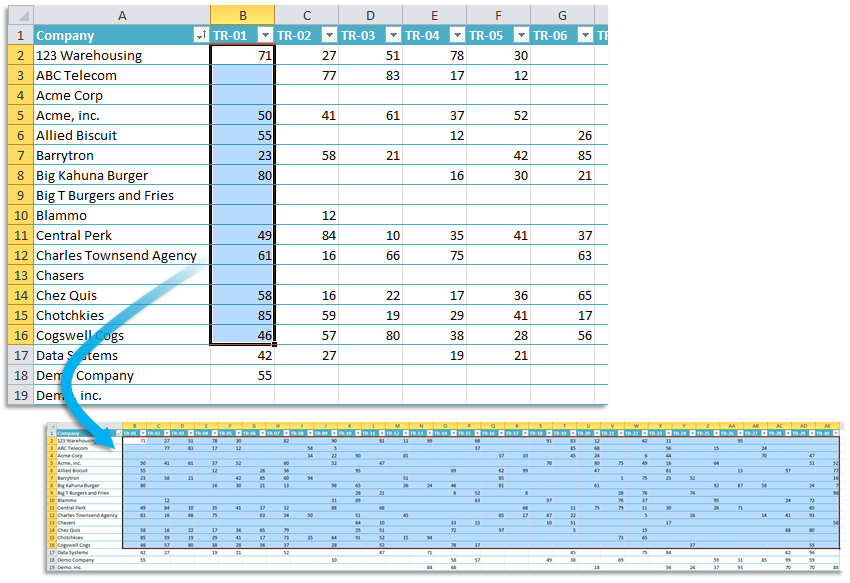
Easily extend your selection of cells to the right until the last used column in your worksheet without scrolling manually.
This tool is especially useful when Excel's built-in shortcuts don't work as expected:
- 'Control+Shift+→' stops at empty cells, which can be limiting if your data has gaps.
- 'Control+Shift+End' selects extra rows, but you only want to extend horizontally.
Unlike Excel's shortcuts, this tool recognizes the last used column that contains any content, including values, formulas, formatting, or other cell usage. Use it to quickly copy a formula to the rightmost used column or extend your selection without scrolling to find the last relevant column.
By default, you can launch this tool using the Control+Alt+Shift+↓ shortcut.
Starting this tool
Specify a Keyboard Shortcut: ASAP Utilities › My Tools & Shortcuts › Manage My Tools & Shortcuts...
Additional keywords to help you find this tool:
select until last used column in Excel, extend selection to the rightmost used column, expand selection beyond the first nonblank cell, select to last populated column, shortcut to extend selection to the right, extend selection horizontally, continue selection past first blank cell in Excel, how to extend selection past first nonblank cell, Excel shortcut to expand selection to last column, How do I select until the last used column in Excel?, Why does Ctrl+Shift+Arrow stop at blank cells in Excel?
Tip:Alt+P for the previous tool.
Tip: Alt+N for the next tool.

Save Time in Excel. The Easy Way.
ASAP Utilities helps you save time and do what Excel alone can't.
You can get started right away. No training needed.
Most users start with a few tools. Many end up using ASAP Utilities daily.
Used by teams in 28,500+ organizations.
Get Started with ASAP Utilities
Start saving time in Excel with practical tools you can use right away.
-
No sign-up required.
-
-
Free 90-day trial