


Select All Objects
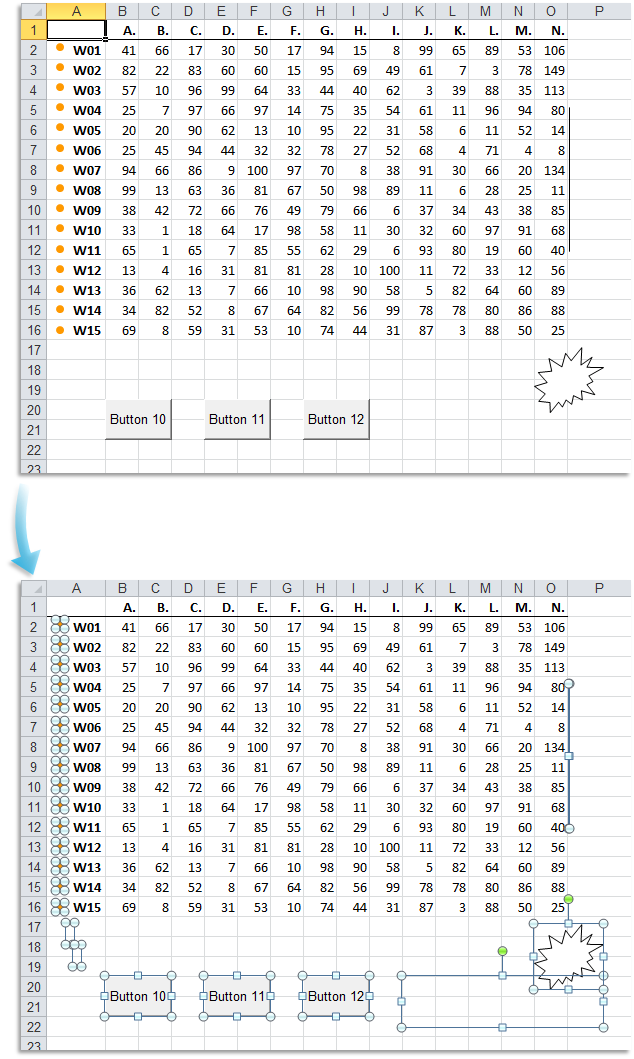
Quickly select all objects on your current worksheet with a single action.
This includes shapes, text boxes, pictures, WordArt, clip art, charts, and form controls from both the Forms toolbar and the Control Toolbox. Instead of manually selecting each object, this tool makes it easy to manage and edit multiple objects simultaneously.
Tip: If you use this frequently, add it to your 'My Tools & Shortcuts' menu and assign a shortcut for faster access.
Starting this tool
Click › Objects & Comments › 3. Select All Objects
Specify a Keyboard Shortcut: ASAP Utilities › My Tools & Shortcuts › Manage My Tools & Shortcuts...
Additional keywords to help you find this tool:
Select multiple shapes, Select all pictures in sheet, Select all images and shapes, Bulk select objects, Select all form controls, How to select all text boxes in Excel, Excel select charts and objects, Highlight all objects in worksheet, Select graphics and controls, Mass select drawings and buttons, Select all embedded objects, Select WordArt, charts, and shapes, Select all controls, Shape selection tool, Group select objects, Drag to select all objects, Shortcut to select all objects
Tip:Alt+P for the previous tool.
Tip: Alt+N for the next tool.

Save Time in Excel. The Easy Way.
ASAP Utilities helps you save time and do what Excel alone can't.
You can get started right away. No training needed.
Most users start with a few tools. Many end up using ASAP Utilities daily.
Used by teams in 28,500+ organizations.
Get Started with ASAP Utilities
Start saving time in Excel with practical tools you can use right away.
-
No sign-up required.
-
-
Free 90-day trial