


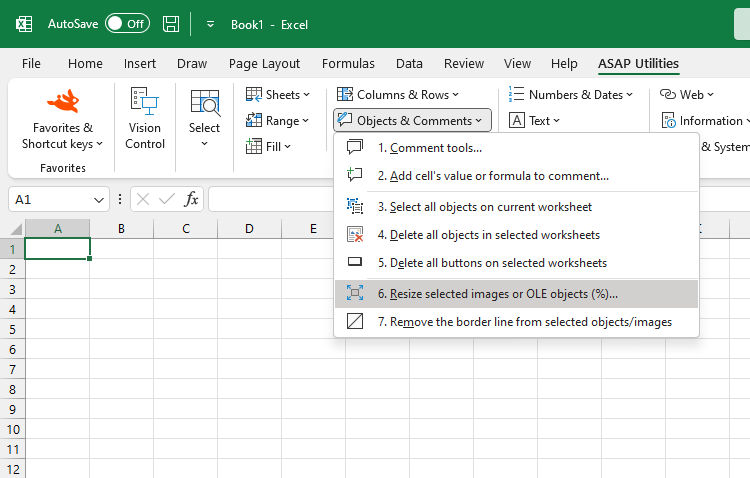
Resize Pictures and OLE Objects (% of Original Size)...
This tool resizes the selected pictures and OLE objects based on a percentage of their original size.
You can enter a percentage when you run the tool.
For example:
- 50% shrinks it to half its original size
- 100% returns it to its original size
- 200% doubles its original size
This makes it easy to resize objects consistently, without manually adjusting them one by one or opening the Format Picture pane in Excel.
Supported object types include:
- Pictures
- Linked pictures
- Embedded OLE objects
- Linked OLE objects
- OLE control objects
This is useful for streamlining layouts, scaling imported graphics, or adjusting multiple objects at once for printing or presentation.
Starting this tool
Specify a Keyboard Shortcut: ASAP Utilities › My Tools & Shortcuts › Manage My Tools & Shortcuts...
Additional keywords to help you find this tool:
Resize pictures in Excel, Resize embedded objects, Excel resize OLE objects, Scale pictures by percentage, Batch resize images, Resize multiple pictures, Picture resize tool, Resize images to original size, Resize photos in Excel by percentage, Scale images in worksheet, Resize linked pictures, Resize inserted objects, Adjust picture size, Image resizer tool, Format picture size, Resize inserted images
Tip:Alt+P for the previous tool.
Tip: Alt+N for the next tool.

Save Time in Excel. The Easy Way.
ASAP Utilities helps you save time and do what Excel alone can't.
You can get started right away. No training needed.
Most users start with a few tools. Many end up using ASAP Utilities daily.
Used by teams in 28,500+ organizations.
Get Started with ASAP Utilities
Start saving time in Excel with practical tools you can use right away.
-
No sign-up required.
-
-
Free 90-day trial