


Save File and Create Backup Copy with Timestamp...
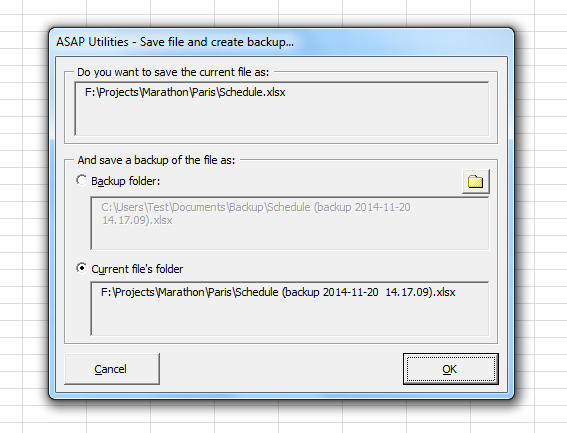
This tool saves your current file and automatically creates a backup copy in your specified folder.
It's a quick and easy way to create a backup copy (a snapshot) of your workbook without manually copying and renaming files.
The backup copy uses the name of your file, with the date and time added to it. This makes it easy to see when each backup was created.
For example, if your file is named:
Sales.xlsx
the backup will be saved as something like:
Sales (backup 2025-04-11 15.28.12).xlsx
This is useful for:
- Keeping older versions of your file
- Protecting against accidental changes or file corruption
- Tracking different versions over time
The last backup folder you used is automatically remembered for future use.
By default, you can launch this tool using the Control+Alt+S shortcut.
Tip:
This tool only works after your file has been saved and has a filename. If the file is new and hasn't been saved, you'll be asked to save it first.
Starting this tool
Specify a Keyboard Shortcut: ASAP Utilities › My Tools & Shortcuts › Manage My Tools & Shortcuts...
Additional keywords to help you find this tool:
backup Excel file, create file backup, automatic backup, save copy with timestamp, version control, Excel version history, file recovery, backup workbook, keep older versions, autosave alternative, Excel backup tool, prevent data loss, save file with date and time, file history, backup folder, protect against accidental changes, restore previous version, save and backup in one click, backup current file, create file snapshot, Excel file snapshot, take snapshot
Tip:Alt+P for the previous tool.
Tip: Alt+N for the next tool.

Save Time in Excel. The Easy Way.
ASAP Utilities helps you save time and do what Excel alone can't.
You can get started right away. No training needed.
Most users start with a few tools. Many end up using ASAP Utilities daily.
Used by teams in 28,500+ organizations.
Get Started with ASAP Utilities
Start saving time in Excel with practical tools you can use right away.
-
No sign-up required.
-
-
Free 90-day trial