


Count All Worksheets, Chart Sheets, and Macro Sheets
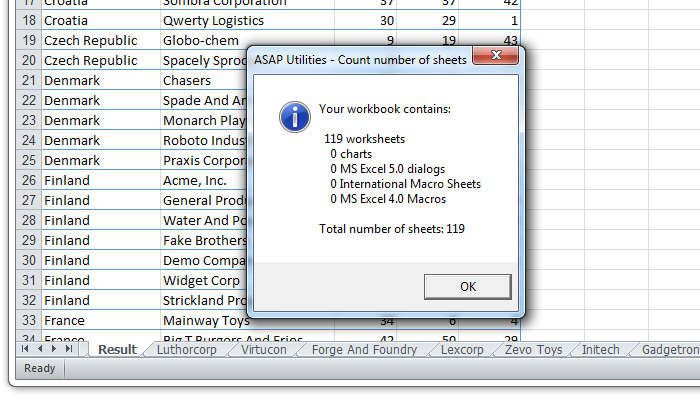
This tool counts all the sheets in your active workbook and shows a detailed breakdown by sheet type.
It reports the number of:
- Worksheets
- Chart sheets
- Excel 5.0 dialog sheets
- Excel 4.0 macro sheets
- International macro sheets
At the bottom, it also shows the total number of sheets in the workbook.
- Quickly find out how many sheets are in your workbook
- Save time compared to manually counting sheets
- Audit the structure of a workbook
- Check for legacy sheet types during cleanup, migration, or upgrades
Tip:
Besides regular worksheets and chart sheets, some workbooks can also contain hidden or older sheet types, such as Excel 4.0 macro sheets. These are often invisible but can cause issues when upgrading, importing, or sharing files. This tool helps you easily find and count all sheet types.
Starting this tool
Specify a Keyboard Shortcut: ASAP Utilities › My Tools & Shortcuts › Manage My Tools & Shortcuts...
Additional keywords to help you find this tool:
count sheets workbook, count worksheets Excel, count sheets Excel, count chart sheets, count macro sheets, total sheets in workbook, Excel sheet counter, sheet types in workbook, Excel count sheets tool, audit workbook sheets, check number of sheets Excel, find legacy sheets Excel
Tip:Alt+P for the previous tool.
Tip: Alt+N for the next tool.

Save Time in Excel. The Easy Way.
ASAP Utilities helps you save time and do what Excel alone can't.
You can get started right away. No training needed.
Most users start with a few tools. Many end up using ASAP Utilities daily.
Used by teams in 28,500+ organizations.
Get Started with ASAP Utilities
Start saving time in Excel with practical tools you can use right away.
-
No sign-up required.
-
-
Free 90-day trial