


Find #REF! Formula Errors (Broken References)
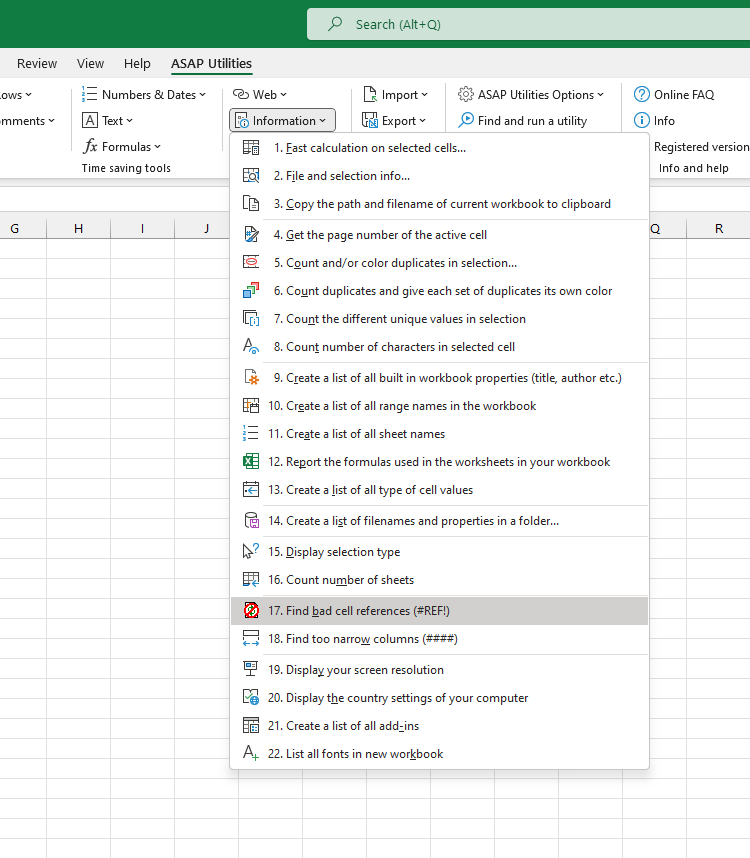
This tool quickly finds all cells on your active worksheet that contain #REF! formula errors.
It then selects these cells so you can easily locate and fix the broken references.
It scans the current sheet and selects all cells where formulas refer to missing or deleted cells, ranges, or sheets, resulting in a #REF! error.
This is useful when you want to:
- Quickly locate and fix broken formulas
- Clean up workbooks before sharing or archiving
- Repair errors caused by deleted sheets, ranges, or renamed cells
- Save time compared to manually using Find & Replace to search for #REF!
Note:
Excel displays #REF! when a formula tries to refer to something that no longer exists. This tool automatically finds and selects those problem cells, saving you time compared to searching manually.
Starting this tool
Specify a Keyboard Shortcut: ASAP Utilities › My Tools & Shortcuts › Manage My Tools & Shortcuts...
Additional keywords to help you find this tool:
find #REF errors, locate #REF errors Excel, Excel find broken references, fix #REF formula errors, find broken formulas Excel, Excel #REF! finder, identify #REF! errors, troubleshoot broken links Excel, select cells with #REF! errors, Excel detect broken references
Tip:Alt+P for the previous tool.
Tip: Alt+N for the next tool.

Save Time in Excel. The Easy Way.
ASAP Utilities helps you save time and do what Excel alone can't.
You can get started right away. No training needed.
Most users start with a few tools. Many end up using ASAP Utilities daily.
Used by teams in 28,500+ organizations.
Get Started with ASAP Utilities
Start saving time in Excel with practical tools you can use right away.
-
No sign-up required.
-
-
Free 90-day trial