


Display Regional Settings Used by Excel (Separators & Date Format)
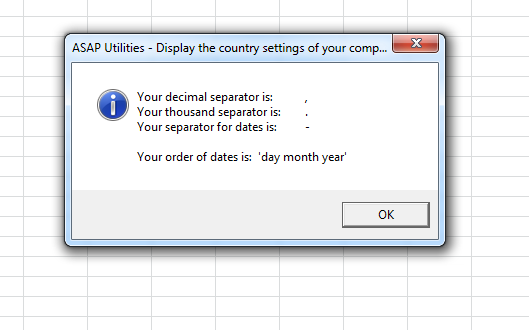
This tool displays the regional settings Excel currently uses on your system.
It shows:
- Decimal separator (e.g., period or comma)
- Thousand separator (e.g., comma, period or space)
- List separator (e.g., comma or semicolon)
- Date separator (e.g., slash, dot, or hyphen)
- Date format order (e.g., day-month-year, month-day-year)
These settings affect how Excel displays and interprets numbers, formula arguments, and dates.
Knowing your current settings is important because mismatched or unexpected separators can lead to:
- Incorrectly imported CSV or TXT files
- Formula errors or miscalculations
- Dates being misinterpreted (e.g., 03-04-2025 as March 4 or April 3)
Starting this tool
Specify a Keyboard Shortcut: ASAP Utilities › My Tools & Shortcuts › Manage My Tools & Shortcuts...
Additional keywords to help you find this tool:
date format, Excel locale settings, region settings, formula separator, CSV import issues, Excel date issues, number formatting, system separators, troubleshoot separator problems, Excel regional configuration, international Excel settings, separator character, date interpretation
Tip:Alt+P for the previous tool.
Tip: Alt+N for the next tool.

Save Time in Excel. The Easy Way.
ASAP Utilities helps you save time and do what Excel alone can't.
You can get started right away. No training needed.
Most users start with a few tools. Many end up using ASAP Utilities daily.
Used by teams in 28,500+ organizations.
Get Started with ASAP Utilities
Start saving time in Excel with practical tools you can use right away.
-
No sign-up required.
-
-
Free 90-day trial