


List Available Fonts in New Workbook
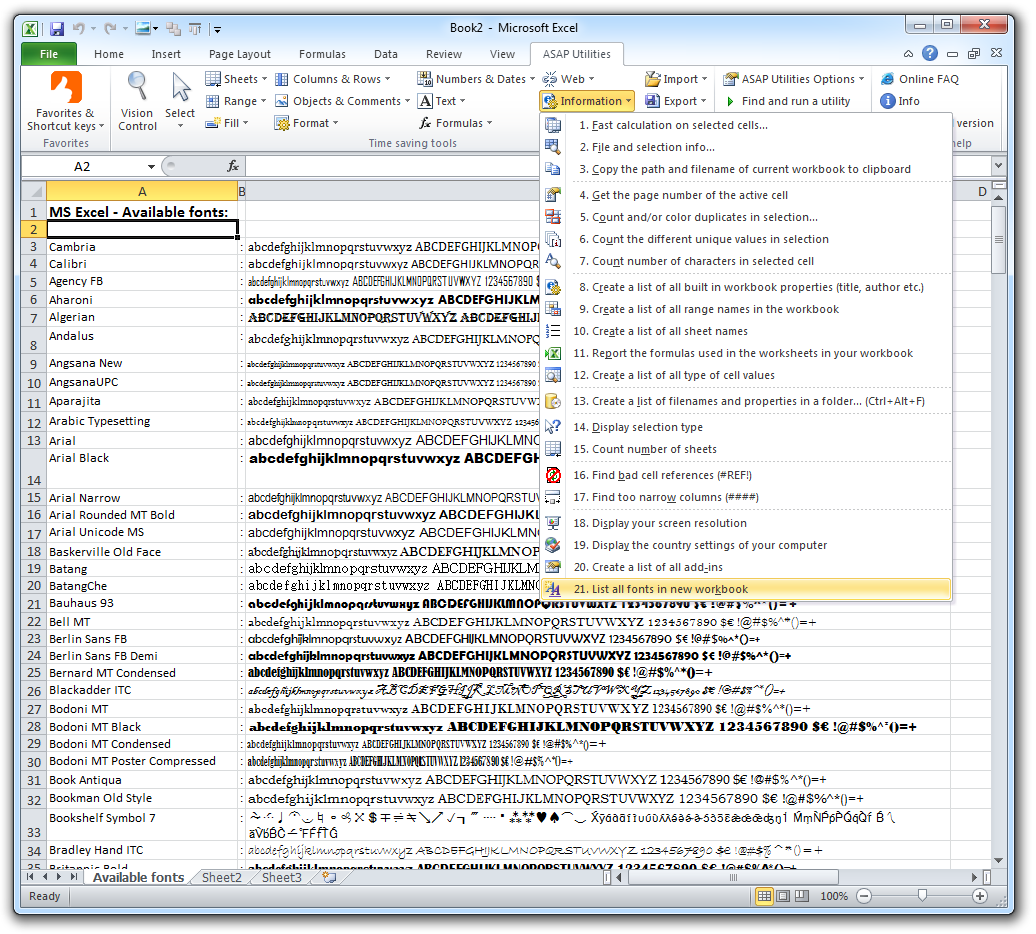
This tool creates a new workbook that lists all the fonts available in Excel on your system.
It shows:
- The name of each font installed on your computer
- A preview showing how the font looks using sample text (lowercase, uppercase, numbers, and symbols)
This report offers a quick way to:
- See which fonts are available on your system
- Visually compare fonts side by side
- Choose the best font for a template, report, dashboard, or design
We created this tool years before Excel's font dropdown included live previews, and it remains a helpful reference for exploring font styles.
Starting this tool
Specify a Keyboard Shortcut: ASAP Utilities › My Tools & Shortcuts › Manage My Tools & Shortcuts...
Additional keywords to help you find this tool:
preview fonts, installed fonts, font viewer, available fonts, font styles, font comparison, font reference, font examples, show fonts in Excel, font browser, see fonts side by side, choose best font, explore fonts, report fonts
Tip:Alt+P for the previous tool.
Tip: Alt+N for the next tool.

Save Time in Excel. The Easy Way.
ASAP Utilities helps you save time and do what Excel alone can't.
You can get started right away. No training needed.
Most users start with a few tools. Many end up using ASAP Utilities daily.
Used by teams in 28,500+ organizations.
Get Started with ASAP Utilities
Start saving time in Excel with practical tools you can use right away.
-
No sign-up required.
-
-
Free 90-day trial