


Copy Selection as HTML Table (for Web Pages)...
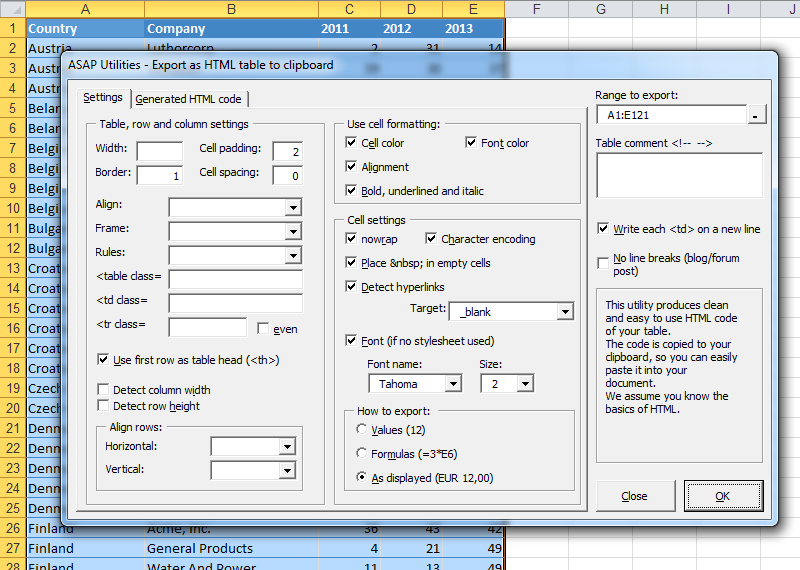
This tool converts your selected range in Excel into clean, ready-to-use HTML table code and copies it to your clipboard.
It's perfect for quickly turning Excel tables into HTML for websites, blogs, or content management systems without writing the HTML manually.
You can fully customize how your table is exported, including:
Table layout options:
- Width, border, cell padding, and spacing
- Alignment, frame, and rules
- Add table headers from the first row
Preserve cell formatting such as:
- Cell colors
- Font colors
- Bold, italic, underline
- Alignment
Cell export settings:
- Use nowrap
- Use character encoding
- Add non-breaking spaces ( ) to empty cells
- Convert existing hyperlinks in cells to clickable links
- Add a target for hyperlinks (like _blank)
- Choose font name and size (if no stylesheet is used)
Export options:
- Export values only (like 12)
- Export formulas (like =A1+B1)
- Export as displayed (like EUR 12,00) (default)
Additional settings:
- Write each <td> tag on a new line for readability
- Export all HTML code in a single line (no line breaks)
- Optionally add a hidden comment with the table
Your last used settings are automatically remembered for quick reuse.
Tip:
This tool creates clean, structured HTML table code that is ready to paste into any webpage, blog post, content editor, or email template that supports HTML.
Basic knowledge of HTML helps but is not required.
Starting this tool
Specify a Keyboard Shortcut: ASAP Utilities › My Tools & Shortcuts › Manage My Tools & Shortcuts...
Additional keywords to help you find this tool:
copy table as HTML from Excel, export table to HTML, convert table to HTML code, create HTML table, clean HTML table, Excel to HTML table generator, export selected cells to HTML, generate HTML table from selection, paste Excel table into website, convert data to HTML, clean, formatting, create, convert HTML, HTML formatting, HTML format, save as HTML, export to HTML
Tip:Alt+P for the previous tool.
Tip: Alt+N for the next tool.

Save Time in Excel. The Easy Way.
ASAP Utilities helps you save time and do what Excel alone can't.
You can get started right away. No training needed.
Most users start with a few tools. Many end up using ASAP Utilities daily.
Used by teams in 28,500+ organizations.
Get Started with ASAP Utilities
Start saving time in Excel with practical tools you can use right away.
-
No sign-up required.
-
-
Free 90-day trial