


Copy Selection as Picture (As Shown When Printed)
This tool copies your current selection as a picture based on how it would appear when printed, and places it on the clipboard.
Use this when you want to:
- Share a visual version of your data exactly as it would appear on paper
- Paste the image into Word, PowerPoint, or graphic design software
- Create a print-accurate image for documentation or approval
The image is created in metafile format (vector-based), which preserves print quality and scales cleanly in applications like Word or PowerPoint.
It saves a few clicks compared to Excel's built-in method (Home > Copy > Copy as Picture > As shown when printed > Picture), and you can assign your own shortcut for even faster access.
Tips:
- To hide gridlines from your picture, go to View > Show and uncheck Gridlines.
- If you use this frequently, add it to your 'My Tools & Shortcuts' menu and assign a shortcut for faster access.
Starting this tool
Specify a Keyboard Shortcut: ASAP Utilities › My Tools & Shortcuts › Manage My Tools & Shortcuts...
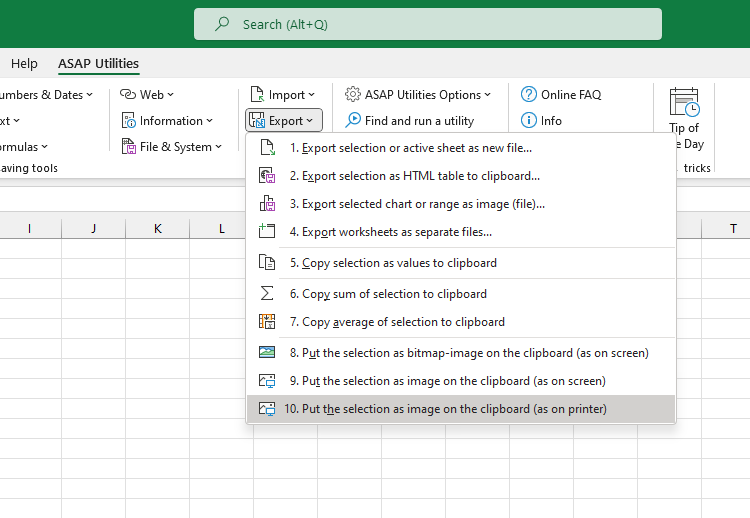
Additional keywords to help you find this tool:
copy print view, excel print layout image, copy as printed, export excel view for printing, print-ready image from Excel, excel to Word print format, save for report layout, copy formatted for printing, copy cells as printed
Tip:Alt+P for the previous tool.
Tip: Alt+N for the next tool.

Save Time in Excel. The Easy Way.
ASAP Utilities helps you save time and do what Excel alone can't.
You can get started right away. No training needed.
Most users start with a few tools. Many end up using ASAP Utilities daily.
Used by teams in 28,500+ organizations.
Get Started with ASAP Utilities
Start saving time in Excel with practical tools you can use right away.
-
No sign-up required.
-
-
Free 90-day trial