


Edit, Extract, and Manage Comments and Notes...
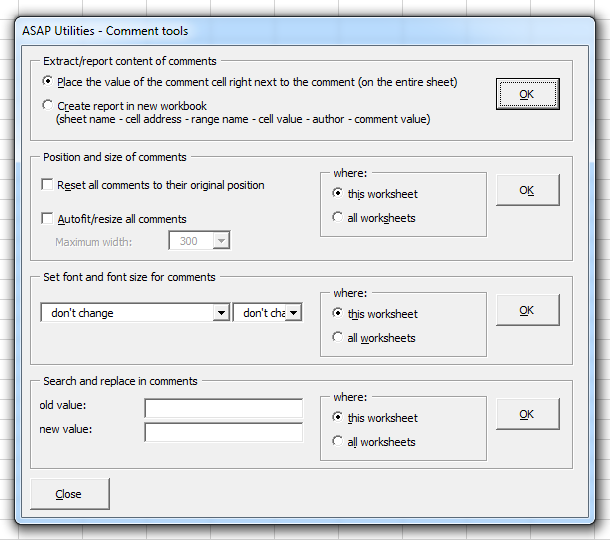
This tool provides a collection of features for working with cell comments in Excel, including both modern comments (threaded) and legacy comments, which are now called Notes in newer versions of Excel.
It allows you to extract comment content, resize and reposition notes, format them, and perform search and replace on the current worksheet or across all worksheets in your workbook.
Works with both comments and notes:
- Place the content of each comment next to its corresponding cell
- Create a detailed report in a new workbook which includes sheet name, cell address, range name, cell value, author, and comment text
Works only with legacy comments (Notes), not threaded comments:
-
Resize or reposition comments
- Reset all Notes to their original position
- Automatically resize Notes to fit their content (Optionally set a maximum width for readability)
- Set the font and font size for all Notes on the current worksheet or across all worksheets
- Find and replace text in Notes across the current worksheet or the entire workbook
Note:
This tool supports both comments and notes for extracting and reporting content.
All other features (resizing, formatting, search and replace) apply only to legacy comments (Notes).
If you want to display the content of a comment or note directly in a cell, you can also use the ASAP Utilities worksheet function:
=ASAPGETCOMMENT()
Starting this tool
Specify a Keyboard Shortcut: ASAP Utilities › My Tools & Shortcuts › Manage My Tools & Shortcuts...
Additional keywords to help you find this tool:
Extract comments to cells, Create a comment report in Excel, Export comments to worksheet, Search and replace in Excel comments, Comment manager tool, Edit Excel notes in bulk, Resize comments automatically, Change font in comments, Apply font size to all notes, Move comments back to original position, Reset note positions, Report all comments with author, Extract legacy comments from Excel, Format legacy comments, Get comment text in cell, List all comments in Excel file, Notes formatting tool, Threaded vs legacy comments, Comment tools for worksheets
Tip:Alt+P for the previous tool.
Tip: Alt+N for the next tool.

Save Time in Excel. The Easy Way.
ASAP Utilities helps you save time and do what Excel alone can't.
You can get started right away. No training needed.
Most users start with a few tools. Many end up using ASAP Utilities daily.
Used by teams in 28,500+ organizations.
Get Started with ASAP Utilities
Start saving time in Excel with practical tools you can use right away.
-
No sign-up required.
-
-
Free 90-day trial