


Extract Hyperlink Addresses from Cells and Shapes...
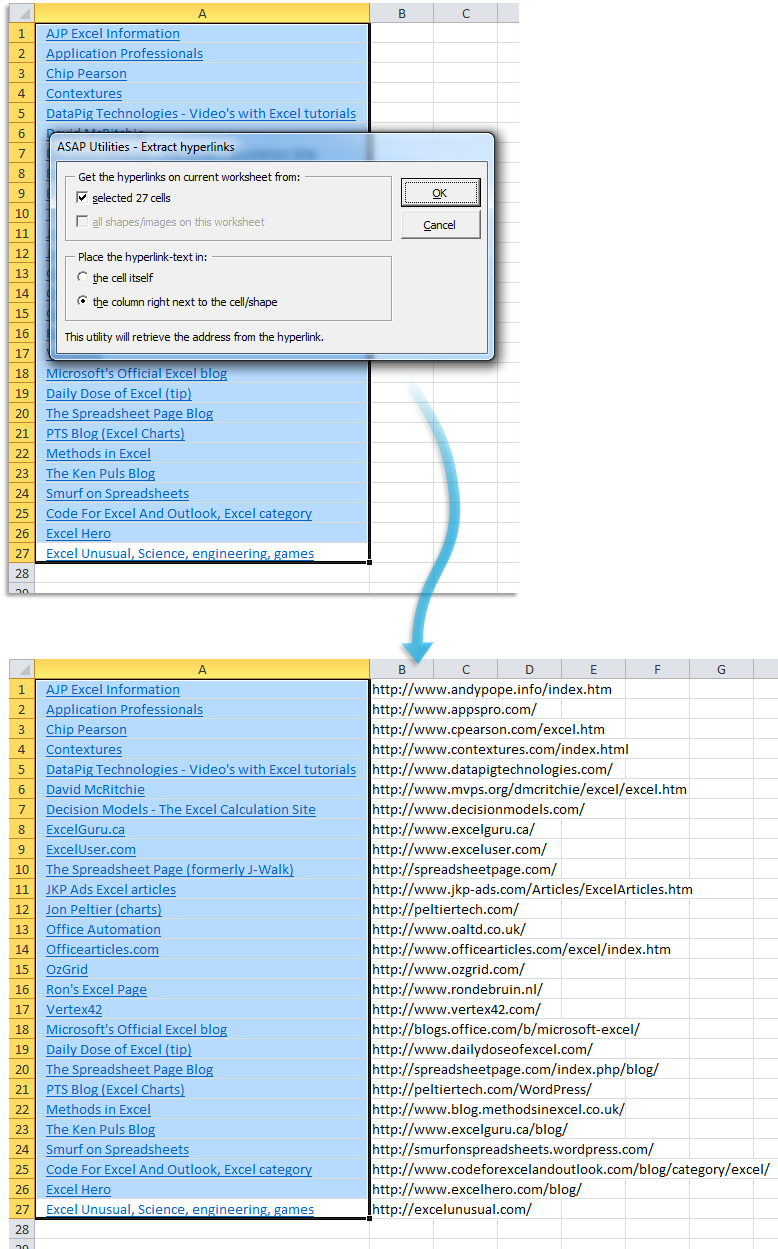
This tool extracts the hyperlink addresses from cells and shapes on your current worksheet and places them into regular cells.
It works with all types of hyperlinks that Excel supports, such as:
- Web addresses (URLs)
- Email addresses (mailto:)
- Links to a place in your workbook (like a specific cell or sheet)
- Links to files or folders on your computer or network
You can choose to get the hyperlinks from:
- The selected cells
- All shapes or images on the worksheet that contain a hyperlink
Shapes can include:
- AutoShapes
- Freeforms
- Pictures
- OLE objects
You can choose where to place the extracted hyperlink address:
- In the original cell, leaving the hyperlink itself unchanged
- In the column directly next to the cell or shape (any existing value will be overwritten)
This tool is useful when you want to extract, review, or export hyperlink addresses from cells or clickable shapes, without opening or editing each one manually.
Your last used settings are automatically remembered for quick reuse.
Tip:
If you want to read a hyperlink address directly from a cell using a formula, you can also use the ASAP Utilities worksheet function:
=ASAPGETHYPERLINK()
Starting this tool
Specify a Keyboard Shortcut: ASAP Utilities › My Tools & Shortcuts › Manage My Tools & Shortcuts...
Additional keywords to help you find this tool:
Extract hyperlink addresses, Extract links from cells, Extract URLs from cells, Get hyperlink address from cell, Extract email addresses from hyperlinks, Extract links from shapes, Extract links from pictures, List all hyperlinks in Excel, Export hyperlinks from Excel, Get URL from hyperlink, Extract mailto links, Get cell link address, Extract internal links, Extract hyperlinks to next column, Read hyperlink from shape, Extract link without removing hyperlink, Extract hyperlinks from Excel images, Extract hyperlink formula, Extract hyperlinks from selected cells, Show hyperlinks
Tip:Alt+P for the previous tool.
Tip: Alt+N for the next tool.

Save Time in Excel. The Easy Way.
ASAP Utilities helps you save time and do what Excel alone can't.
You can get started right away. No training needed.
Most users start with a few tools. Many end up using ASAP Utilities daily.
Used by teams in 28,500+ organizations.
Get Started with ASAP Utilities
Start saving time in Excel with practical tools you can use right away.
-
No sign-up required.
-
-
Free 90-day trial