


Import Data From Delimited Text File (Custom Options)...
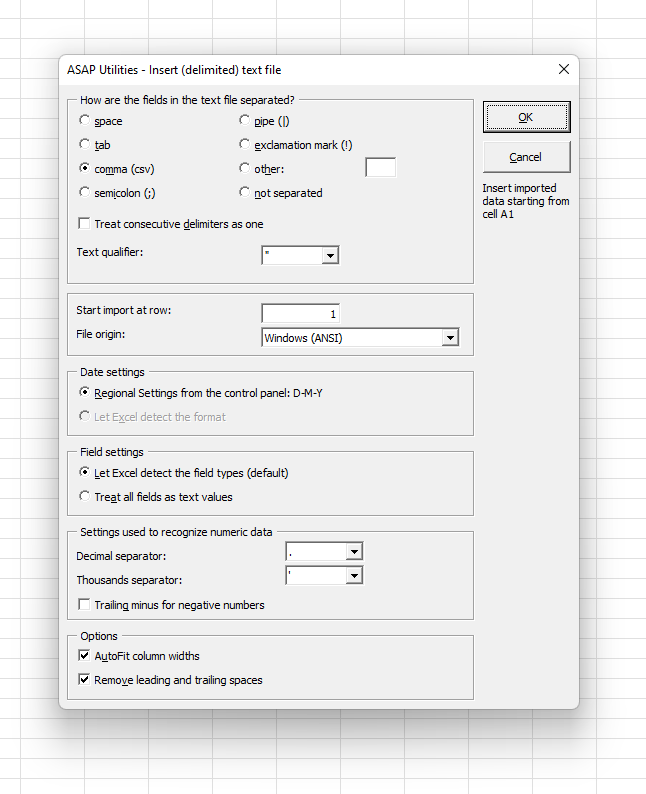
This tool imports the contents of a delimited text file into your current worksheet, starting at the position of the active cell.
You can customize the import settings, including:
-
Delimiter options: Choose how fields are separated: space, tab, comma (CSV), semicolon, pipe (|), exclamation mark (!), or a custom character.
You can also specify whether multiple delimiters should be treated as one, or if the file is not delimited at all. - Text qualifier: Specify how quoted text is handled: none, single quote ('), or double quote (").
- Start import at row: Choose the row where the import begins (e.g., skip headers).
- File origin: Set the text encoding, such as ANSI or UTF-8.
- Field detection: Let Excel automatically detect field types (default), or treat all fields as text (useful to preserve leading zeros)
- Numeric options: Choose decimal and thousands separators and whether to support trailing minus signs for negatives.
-
Additional options:
- AutoFit column widths
- Trim leading and trailing spaces from imported values
Your last used settings are remembered for convenience.
The date format follows your Windows Regional Settings (e.g., D-M-Y or M-D-Y).
This tool is helpful when you need to:
- Import text files with custom delimiters or encodings
- Control how Excel interprets values during the import
- Start importing data from a specific row
- Avoid issues like lost leading zeros or misread numbers
Note:
For more even more advanced import options (such as changing data types per column and regional settings), consider using Excel's Data > Get & Transform Data tools.
Starting this tool
Specify a Keyboard Shortcut: ASAP Utilities › My Tools & Shortcuts › Manage My Tools & Shortcuts...
Additional keywords to help you find this tool:
import text file, delimited text import, custom delimiter, space delimited, tab delimited, comma separated, CSV import, semicolon separator, pipe delimiter, exclamation mark delimiter, skip header rows, preserve leading zeros, treat all fields as text, flexible text import
Tip:Alt+P for the previous tool.
Tip: Alt+N for the next tool.

Save Time in Excel. The Easy Way.
ASAP Utilities helps you save time and do what Excel alone can't.
You can get started right away. No training needed.
Most users start with a few tools. Many end up using ASAP Utilities daily.
Used by teams in 28,500+ organizations.
Get Started with ASAP Utilities
Start saving time in Excel with practical tools you can use right away.
-
No sign-up required.
-
-
Free 90-day trial