


Freeze Panes on Multiple Sheets at Once
Quickly apply Freeze Panes to multiple worksheets at once, keeping headers, labels, or key data visible while scrolling.
In Excel, you can only freeze panes on one sheet at a time, which can be slow and repetitive.
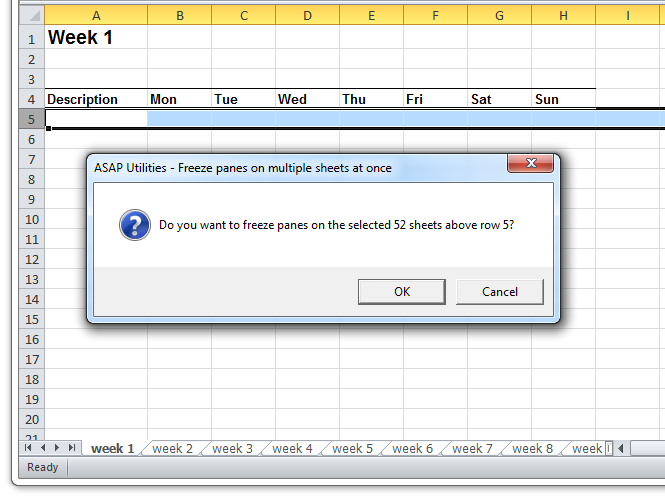
This tool lets you apply the same freeze pane settings to multiple sheets.
Freeze Panes freezes the rows above and the columns left of the selected cell.
- If only one sheet is selected, it applies to all worksheets in your workbook
- If multiple sheets are selected, it applies to those sheets only.
Before running this tool, place your selection based on how you want panes to be frozen:
- Freeze top row(s): Select the first row below the row(s) you want to lock in place.
- Freeze first column(s): Select the first column to the right of the column(s) you want to lock in place.
- Freeze both rows and columns: Select the cell below the rows and to the right of the columns you want to keep visible when you scroll.
Starting this tool
Specify a Keyboard Shortcut: ASAP Utilities › My Tools & Shortcuts › Manage My Tools & Shortcuts...
Additional keywords to help you find this tool:
Lock rows and columns on multiple worksheets, Freeze top row across multiple sheets, Freeze first column on multiple worksheets, Apply freeze panes to multiple sheets at once, Fix headers in Excel on multiple sheets, Freeze first row and column on multiple sheets, Lock headings across all worksheets, Freeze panes on multiple tabs, Keep headers visible on multiple sheets, Apply same freeze panes settings across sheets
Tip:Alt+P for the previous tool.
Tip: Alt+N for the next tool.

Save Time in Excel. The Easy Way.
ASAP Utilities helps you save time and do what Excel alone can't.
You can get started right away. No training needed.
Most users start with a few tools. Many end up using ASAP Utilities daily.
Used by teams in 28,500+ organizations.
Get Started with ASAP Utilities
Start saving time in Excel with practical tools you can use right away.
-
No sign-up required.
-
-
Free 90-day trial