


Unhide All Sheets at Once
Unhide all hidden worksheets in your workbook with a single action.
In Excel, you could only unhide one sheet at a time for many years. ASAP Utilities introduced this feature in 1999, long before Microsoft added similar functionality to Excel in 2021.
This tool saves time by making all hidden sheets visible at once, including those set to xlVeryHidden, which cannot be unhidden using Excel's standard 'Unhide' option.
Starting this tool
Click › Sheets › 12. Unhide All Sheets at Once
Specify a Keyboard Shortcut: ASAP Utilities › My Tools & Shortcuts › Manage My Tools & Shortcuts...
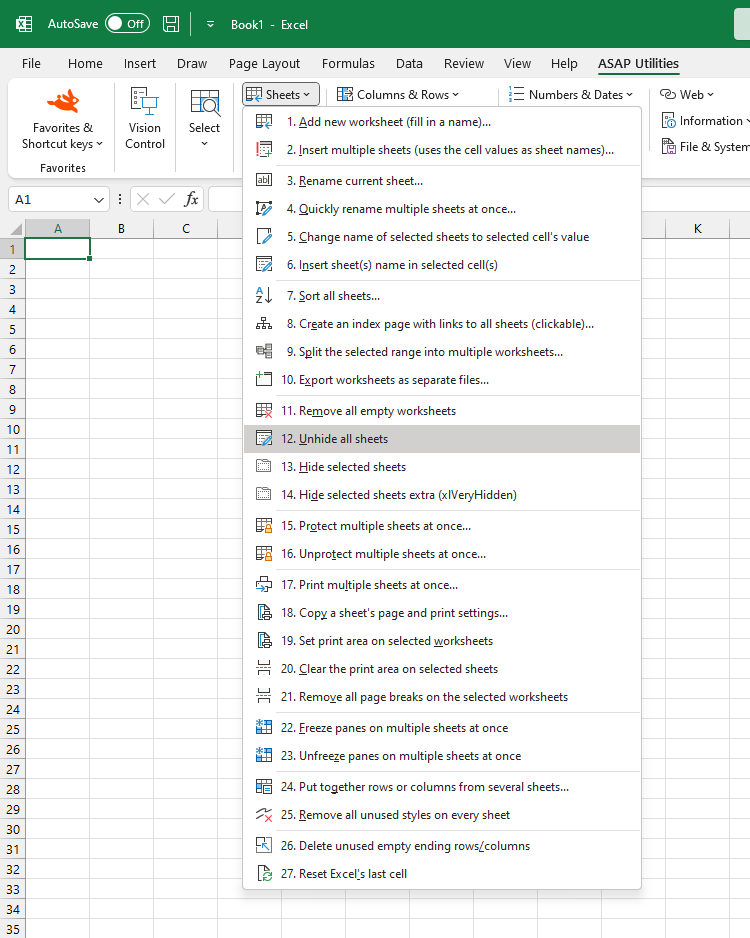
Additional keywords to help you find this tool:
Show all hidden sheets at once, Unhide multiple sheets, Unhide xlVeryHidden sheets in Excel, Make all hidden sheets visible, Unhide all worksheets with one click, Unhide all sheets in Excel simultaneously, How to show all hidden worksheets in Excel, Is there a shortcut to unhide all worksheets in Excel?
Tip:Alt+P for the previous tool.
Tip: Alt+N for the next tool.

Save Time in Excel. The Easy Way.
ASAP Utilities helps you save time and do what Excel alone can't.
You can get started right away. No training needed.
Most users start with a few tools. Many end up using ASAP Utilities daily.
Used by teams in 28,500+ organizations.
Get Started with ASAP Utilities
Start saving time in Excel with practical tools you can use right away.
-
No sign-up required.
-
-
Free 90-day trial