


Reset Last Cell to Fix Ctrl+End Behavior...
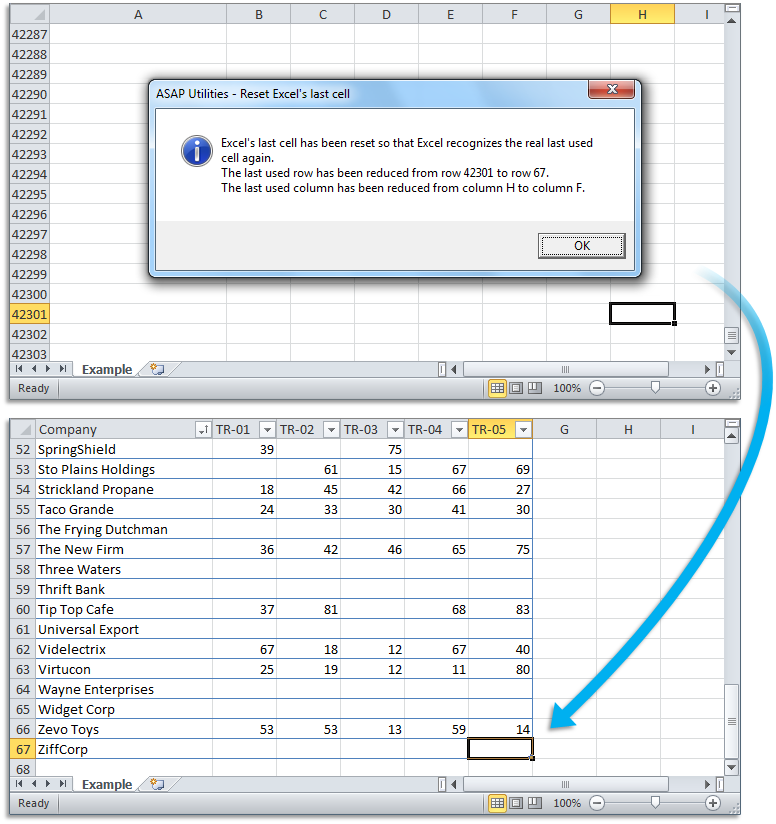
This tool fixes issues with Excel's Control+End shortcut selecting a cell far beyond your actual data.
It resets Excel's last-used cell tracking and restores proper worksheet behavior. It can also reduce file size and improve performance.
You can use this tool when:
- Control+End selects a cell far outside the range of your actual data
- Your workbook has a much larger file size than expected
- Extra pages show up when printing
- Scrollbars are tiny even though little data is present
- Excel is slow or shows "Out of Memory" errors
By resetting the last cell on your worksheet, Excel more accurately detects the true end of your data.
Options:
Also check for formatting-only cells (e.g., borders, background color) that may extend the last cell. This may be slower but more thorough.
By default, you can launch this tool using the Control+Alt+R shortcut.
Microsoft describes this issue in the support article 244435:
Fix Excel's Last Cell Issue - Microsoft Support
https://support.microsoft.com/en-us/topic/244435
Tip: Press Control+End to check if Excel selects a blank cell far beyond your actual data. If it does, this tool can fix it.
Starting this tool
Specify a Keyboard Shortcut: ASAP Utilities › My Tools & Shortcuts › Manage My Tools & Shortcuts...
Additional keywords to help you find this tool:
Fix Excel last used cell detection, Ctrl+End goes too far in Excel, Reduce file size by clearing excess rows, Fix tiny scrollbars in Excel, Delete extra blank rows and columns in Excel, Remove unused rows and columns in Excel, Why does Excel scroll past my data?, Fix last used cell issue, Excel file too large due to extra cells, Reset scroll area in Excel, Why is my Excel file so big with little data?
Tip:Alt+P for the previous tool.
Tip: Alt+N for the next tool.

Save Time in Excel. The Easy Way.
ASAP Utilities helps you save time and do what Excel alone can't.
You can get started right away. No training needed.
Most users start with a few tools. Many end up using ASAP Utilities daily.
Used by teams in 28,500+ organizations.
Get Started with ASAP Utilities
Start saving time in Excel with practical tools you can use right away.
-
No sign-up required.
-
-
Free 90-day trial