


Color Every nth Row or Column in Selection...
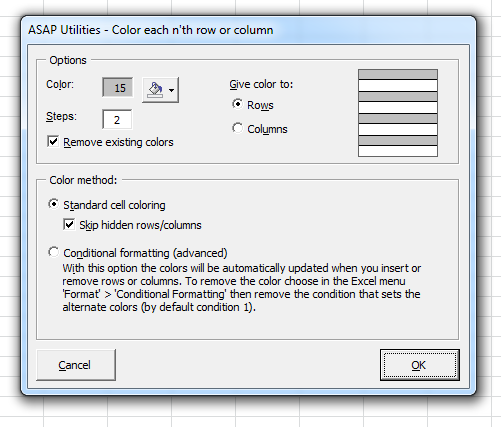
This tool fills every nth row or column in your selected range with a specified color, a technique also known as color banding or alternate shading. It visually separates rows or columns, improving the readability of large data tables.
Unlike Excel's built-in Table Styles, which applies alternating row colors only within a structured table, this tool works on any selected range and offers more flexibility.
You can apply the coloring to rows or columns, choose the color, and set the interval (for example, every second, third, fifth, or tenth row or column).
There are two methods available:
- Standard Coloring: Colors the selected rows or columns with the option to skip hidden ones.
- Conditional Formatting (Advanced): Automatically updates the colors when you insert or remove rows or columns. This method removes any existing conditional formatting rules in your selection. To remove the coloring, you can delete the rule (by default, the first) from Excel's Home > Conditional Formatting menu.
By default, you can launch this tool using the Control+Alt+C shortcut.
Starting this tool
Specify a Keyboard Shortcut: ASAP Utilities › My Tools & Shortcuts › Manage My Tools & Shortcuts...
Additional keywords to help you find this tool:
Apply zebra striping in Excel, Alternate shading in Excel, Color every nth row, Color every nth column, Color banding tool, Row color banding, Alternate row coloring tool, Colorbanding, Excel conditional formatting alternate shading, Color every nth cell in selection, Excel alternate shading tool, Apply alternate colors to rows, Excel table readability tool
Tip:Alt+P for the previous tool.
Tip: Alt+N for the next tool.

Save Time in Excel. The Easy Way.
ASAP Utilities helps you save time and do what Excel alone can't.
You can get started right away. No training needed.
Most users start with a few tools. Many end up using ASAP Utilities daily.
Used by teams in 28,500+ organizations.
Get Started with ASAP Utilities
Start saving time in Excel with practical tools you can use right away.
-
No sign-up required.
-
-
Free 90-day trial