


Join Selected Values Vertically with a Line Break Separator
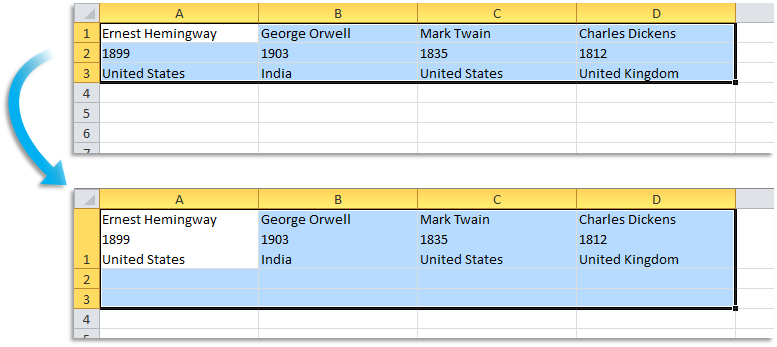
This tool merges data from the rows in your selection by joining adjacent cell values vertically, separating them with a line break, into the top cell of each column.
In doing so, the data from the lower rows is removed and consolidated into the top cell of each column.
This tool is a quick alternative to Excel's CONCATENATE(), CONCAT(), or TEXTJOIN() functions.
Tip:
Try our =ASAPMERGECELLS() function for even more flexibility in combining values.
Starting this tool
Specify a Keyboard Shortcut: ASAP Utilities › My Tools & Shortcuts › Manage My Tools & Shortcuts...
Additional keywords to help you find this tool:
Merge row data with line breaks, Join row cells with line break separator, Combine row cells with Alt+Enter, Excel merge cells with line breaks, Consolidate row data with line breaks, Join cell contents with a line break, Merge cell contents using CHAR(10), Excel text join with line breaks, Combine multiple cells with line breaks
Tip:Alt+P for the previous tool.
Tip: Alt+N for the next tool.

Save Time in Excel. The Easy Way.
ASAP Utilities helps you save time and do what Excel alone can't.
You can get started right away. No training needed.
Most users start with a few tools. Many end up using ASAP Utilities daily.
Used by teams in 28,500+ organizations.
Get Started with ASAP Utilities
Start saving time in Excel with practical tools you can use right away.
-
No sign-up required.
-
-
Free 90-day trial