


Choose and Unhide Hidden Rows and Columns...
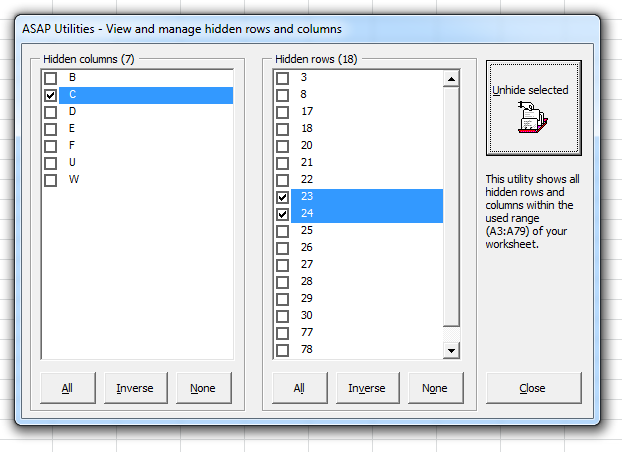
This tool shows a complete list of all hidden rows and columns on your worksheet, allowing you to choose which ones to unhide.
This tool gives you more flexibility than Excel's built-in unhide method, which requires manually selecting the surrounding rows or columns. For example, if a group of rows (for example, rows 10 to 50) is hidden in Excel, you normally have to unhide all of them at once; you cannot unhide just a single row like row 20. With this tool, you can selectively unhide individual rows or columns, making it much easier to manage hidden data.
Starting this tool
Specify a Keyboard Shortcut: ASAP Utilities › My Tools & Shortcuts › Manage My Tools & Shortcuts...
Additional keywords to help you find this tool:
Unhide hidden rows in Excel, Unhide hidden columns in Excel, Choose and unhide rows and columns, Selectively unhide rows in Excel, Reveal hidden rows and columns, Manage hidden rows and columns, Display hidden rows, Hidden data management, Show hidden cells
Tip:Alt+P for the previous tool.
Tip: Alt+N for the next tool.

Save Time in Excel. The Easy Way.
ASAP Utilities helps you save time and do what Excel alone can't.
You can get started right away. No training needed.
Most users start with a few tools. Many end up using ASAP Utilities daily.
Used by teams in 28,500+ organizations.
Get Started with ASAP Utilities
Start saving time in Excel with practical tools you can use right away.
-
No sign-up required.
-
-
Free 90-day trial