


Select, Hide, or Delete Rows or Columns Based on Custom Criteria...
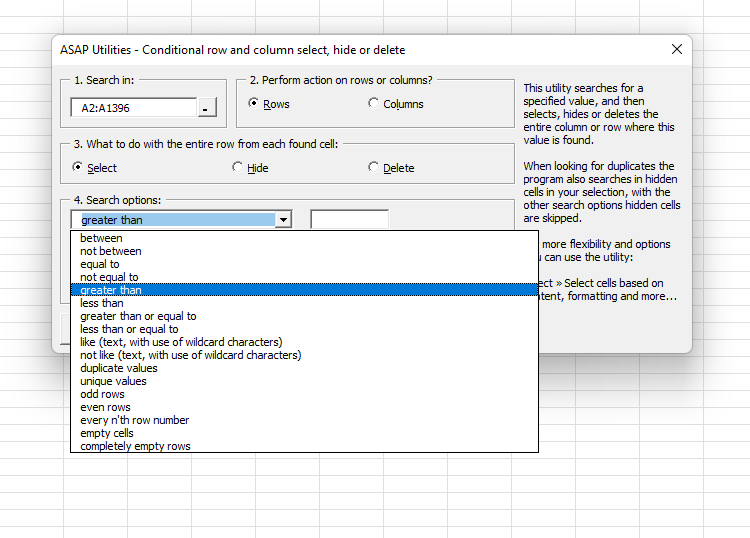
This tool provides a fast and flexible way to select, hide, or delete entire rows or columns based on specific criteria, making it a powerful alternative or complement to Excel's AutoFilter.
You can apply the following criteria to select, hide, or remove entire rows or columns:
- between
- not between
- equal to
- not equal to
- greater than
- less than
- greater than or equal to
- less than or equal to
- like (text, with use of wildcard characters)
- not like (text, with use of wildcard characters)
- duplicate values (you can choose to keep the first value)
- unique values
- odd rows
- even rows
- every n'th row number
- odd columns
- even columns
- every n'th column number
- empty cells
- completely empty rows
- completely empty columns
Additional options:
- You can choose to make the search case-sensitive for text, duplicate, and unique value criteria.
- Hidden cells are ignored, except when searching for duplicate or unique values.
Starting this tool
Specify a Keyboard Shortcut: ASAP Utilities › My Tools & Shortcuts › Manage My Tools & Shortcuts...
Additional keywords to help you find this tool:
Delete every second row, Double, Based on criteria, Duplicate lines,highlight , filter, select rows or column in intervals, duplication, the same value, highlight, line, select within, choose, pick, dedupe, deduplicate, undouble, blanks, delete blank rows, blank lines, only
Tip:Alt+P for the previous tool.
Tip: Alt+N for the next tool.

Save Time in Excel. The Easy Way.
ASAP Utilities helps you save time and do what Excel alone can't.
You can get started right away. No training needed.
Most users start with a few tools. Many end up using ASAP Utilities daily.
Used by teams in 28,500+ organizations.
Get Started with ASAP Utilities
Start saving time in Excel with practical tools you can use right away.
-
No sign-up required.
-
-
Free 90-day trial