


Change to Capitalize First Letter Only
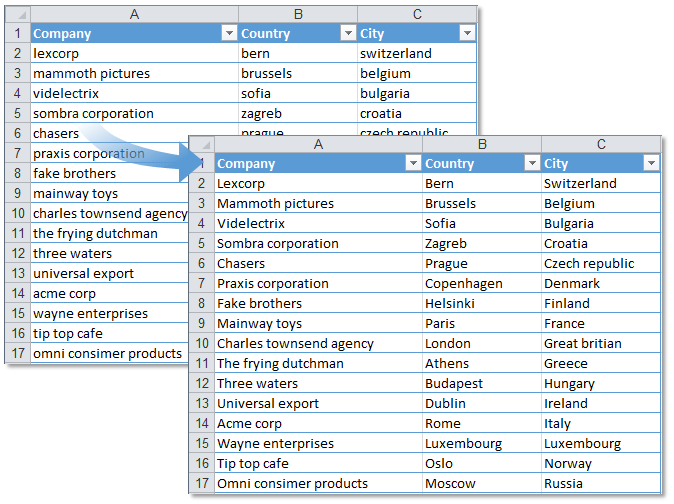
This tool capitalizes the first letter it finds in each selected cell and leaves the rest of the content unchanged.
It works on both plain values and formulas.
For example:
- "pending approval" becomes "Pending approval"
- "123 test" becomes "123 Test"
- "HELLO world" stays "HELLO world" (unchanged, since the first letter is already uppercase)
- "example: Already Mixed" becomes "Example: Already Mixed"
This is useful when you want sentence-style capitalization for things like labels, product descriptions, or task names, without changing the rest of the text or applying full title case.
Starting this tool
Specify a Keyboard Shortcut: ASAP Utilities › My Tools & Shortcuts › Manage My Tools & Shortcuts...
Additional keywords to help you find this tool:
Capitalize first letter of each cell, Capitalize first word only, Change first letter to uppercase, Change to sentence-style capitalization, Transform first character to uppercase, Capitalize beginning of text, Make first letter uppercase without changing rest, Convert to capital letter at start of cell, Change only first letter to uppercase, Capitalize first character, Preprocess text to start with capital letter, Start sentence with capital in Excel, How to make only first letter uppercase, Change first letter to capital, Convert beginning of text to capital letter, How to capitalize only first letter
Tip:Alt+P for the previous tool.
Tip: Alt+N for the next tool.

Save Time in Excel. The Easy Way.
ASAP Utilities helps you save time and do what Excel alone can't.
You can get started right away. No training needed.
Most users start with a few tools. Many end up using ASAP Utilities daily.
Used by teams in 28,500+ organizations.
Get Started with ASAP Utilities
Start saving time in Excel with practical tools you can use right away.
-
No sign-up required.
-
-
Free 90-day trial