
Excel tip: Help, my columns are displayed backwards
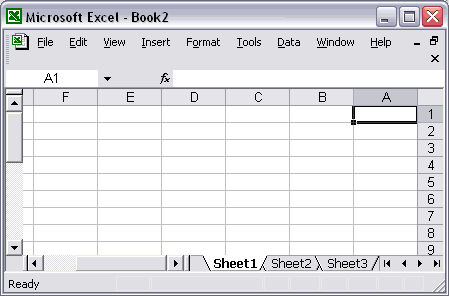
Date: 3 january 2007Just got a question that migh be interesting to show here about columns that are displayed backwards. The columns are in reverse alphabetical order and start at the upper right hand corner. The row numbers are on the right side of excel instead of the left.
Example sheet, displayed from right to left:
Solution
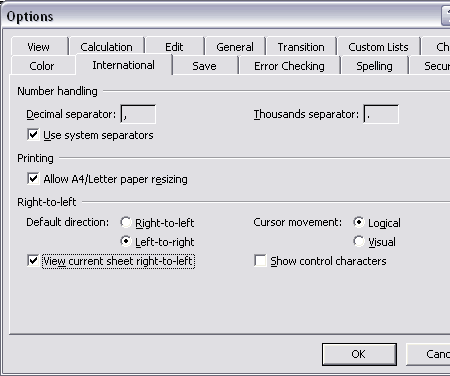
In fact, this is a (per sheet) setting in Excel.In the Excel menu choose: Tools » Options
In the options-dialog that shows select the "International" tab and uncheck "View current sheet right-to-left".
« back
©1999-2026 ∙ ASAP Utilities ∙ A Must in Every Office BV ∙ The Netherlands
🏆 Winner of the "Best Microsoft Excel Add-in" Award at the Global Excel Summit 2025 in London!
For over 26 years, ASAP Utilities has helped users worldwide save time and do what Excel alone cannot.
🏆 Winner of the "Best Microsoft Excel Add-in" Award at the Global Excel Summit 2025 in London!
For over 26 years, ASAP Utilities has helped users worldwide save time and do what Excel alone cannot.