


Esta página está disponível no momento apenas em inglês.
How to solve the error message: "Office has detected a problem with this file" or "Excel cannot open the file..."
We've only got this reported a few times and can't reproduce this ourselves, but we still want to address it here:
Question
A few users reported that after they installed ASAP Utilities 7 on their system with Excel 2010, they get the following error message when they start Excel "Office has detected a problem with this file" and then ASAP Utilities doesn't start.
*update*
In Q4 of 2021 we got this reported from a few users with Excel 365 too. Suddenly they received the error "Excel cannot open the file 'ASAP Utilities.xlam' because the file format or file extension is not valid. Verify that the file has not been corrupted and that the file extension matches the format of the file." But the file is still correct and hasn't changed.
** update 2 **
Based on the contact with a client in November 2021 we found that this my be caused by one or more rules in Windows Defender too.
If you use Windows Defender, then please read the following:
Why ASAP Utilities uses Win32 APIs and how to make an exception for ASAP Utilities in Windows Defender
Answer
Official download
First make sure that you have downloaded ASAP Utilities from our official website (https://www.asap-utilities.com).
(Unfortunately there are some bad people abusing our good name and offering a modified or pirated version of our program on their own websites which may contain malware. This is our "No malware/no viruses Policy")
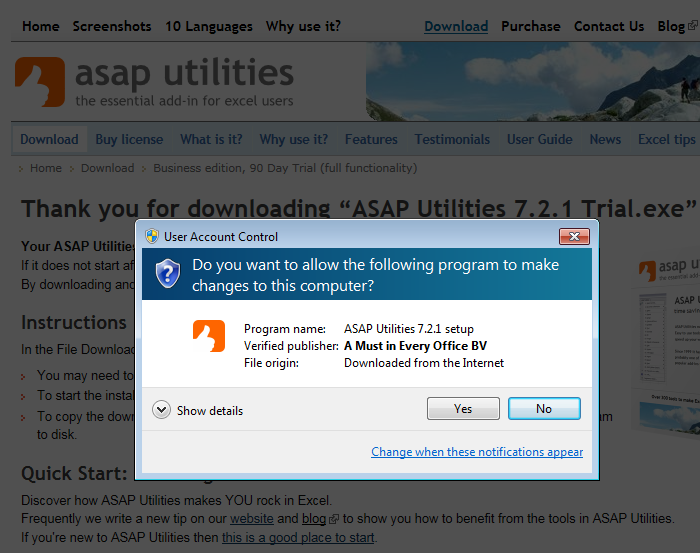
The official ASAP Utilities setup and our add-in files are all signed with a digital certificate. This signature provides you with the assurance that, what you are about to use, comes from our company and that it has not been tampered with.
The name of our company is A Must in Every Office BV and it is show as the verified publisher:
Latest Office and Windows updates
Please verify that you are running the latest Office and Windows update so that the Microsoft Office File Validation works correct.
The importance of Microsoft Office Update | Fix random crashes and performance issues - ASAP Utilities Blog (asap-utilities.com)
Trusted Locations
If you have verified that you have installed the official version of ASAP Utilities and you still get the error "Office has detected a problem with this file", then there's something wrong with the Office File Validation on your system.
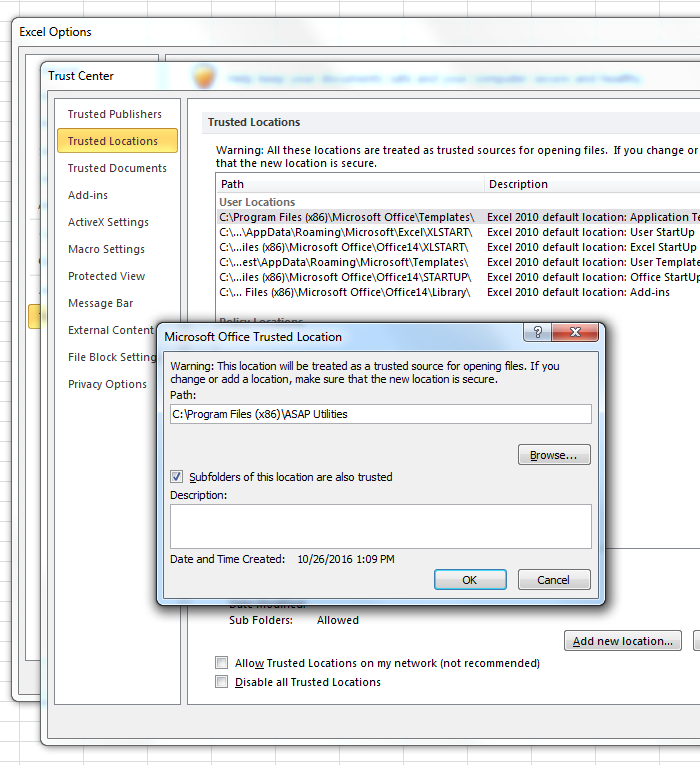
You can use a workaround presented by Microsoft, by adding the ASAP Utilities installation folder to the list of trusted locations in Excel.
To add a trusted location:
Click File > Options.
Click Trust Center > Trust Center Settings >Trusted Locations.
Click Add new location.
Click Browse to find the ASAP Utilities setup folder, select a folder, then check the Subfolders of this location are also trusted option and then click OK.
Usually ASAP Utilities is installed in the folderC:\Program Files (x86)\ASAP Utilities\
The language specific ASAP Utilities ribbon helper file, such as for example 'ASAP_Utilities_ribbon_en-us.xlam' is stored per user in the local roaming user profile:%APPDATA%\Roaming\ASAP Utilities\resources
More information:
Excel workbooks may not open after MS16-088 is installed
https://docs.microsoft.com/en-us/office/troubleshoot/excel/workbooks-not-open
Microsoft Support: Error message in Microsoft Office 2010: "Office has detected a problem with this file"
https://support.microsoft.com/en-us/kb/973736
Microsoft Support: Add, remove, or change a trusted location
https://support.microsoft.com/en-us/office/add-remove-or-change-a-trusted-location-7ee1cdc2-483e-4cbb-bcb3-4e7c67147fb4