


Import Data From Space-Delimited Text File...
This tool imports the contents of a space-delimited text file into your current worksheet, starting at the position of the active cell.
It splits the data into columns wherever one or more space characters appear (multiple consecutive spaces are treated as a single separator). It uses your system's regional settings to interpret numbers and dates.
This tool is a faster alternative to manually opening the text file and copying the data into your target sheet.
Use it when you want to:
- Open the data from structured space-delimited files directly in your existing worksheet
- Analyze or convert plain text data exports
- Reuse text file data for reporting, calculations, or cleanup tasks
Note:
For more advanced import options (such as changing data types and regional settings), consider using Excel's Data > Get & Transform Data tools.
Starting this tool
Specify a Keyboard Shortcut: ASAP Utilities › My Tools & Shortcuts › Manage My Tools & Shortcuts...
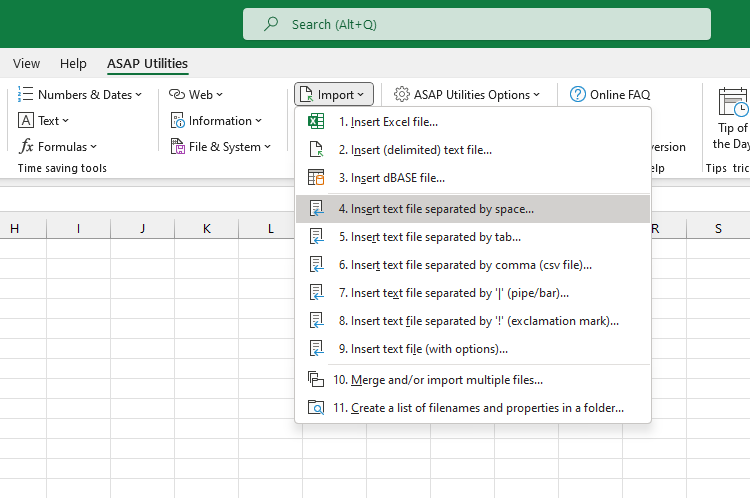
Additional keywords to help you find this tool:
space separated file, import text file, parse space-separated data, import data from text file, read plain text data, import data using space separator, convert space-delimited file, import plain text, insert text file into Excel, text file to table, load space-separated data, paste structured text, import fixed format text
Tip:Alt+P for the previous tool.
Tip: Alt+N for the next tool.

Save Time in Excel. The Easy Way.
ASAP Utilities helps you save time and do what Excel alone can't.
You can get started right away. No training needed.
Most users start with a few tools. Many end up using ASAP Utilities daily.
Used by teams in 28,500+ organizations.
Get Started with ASAP Utilities
Start saving time in Excel with practical tools you can use right away.
-
No sign-up required.
-
-
Free 90-day trial