


Manage My Tools & Shortcuts...
ASAP Utilities includes a wide variety of helpful tools, allowing you to choose exactly what fits your workflow.
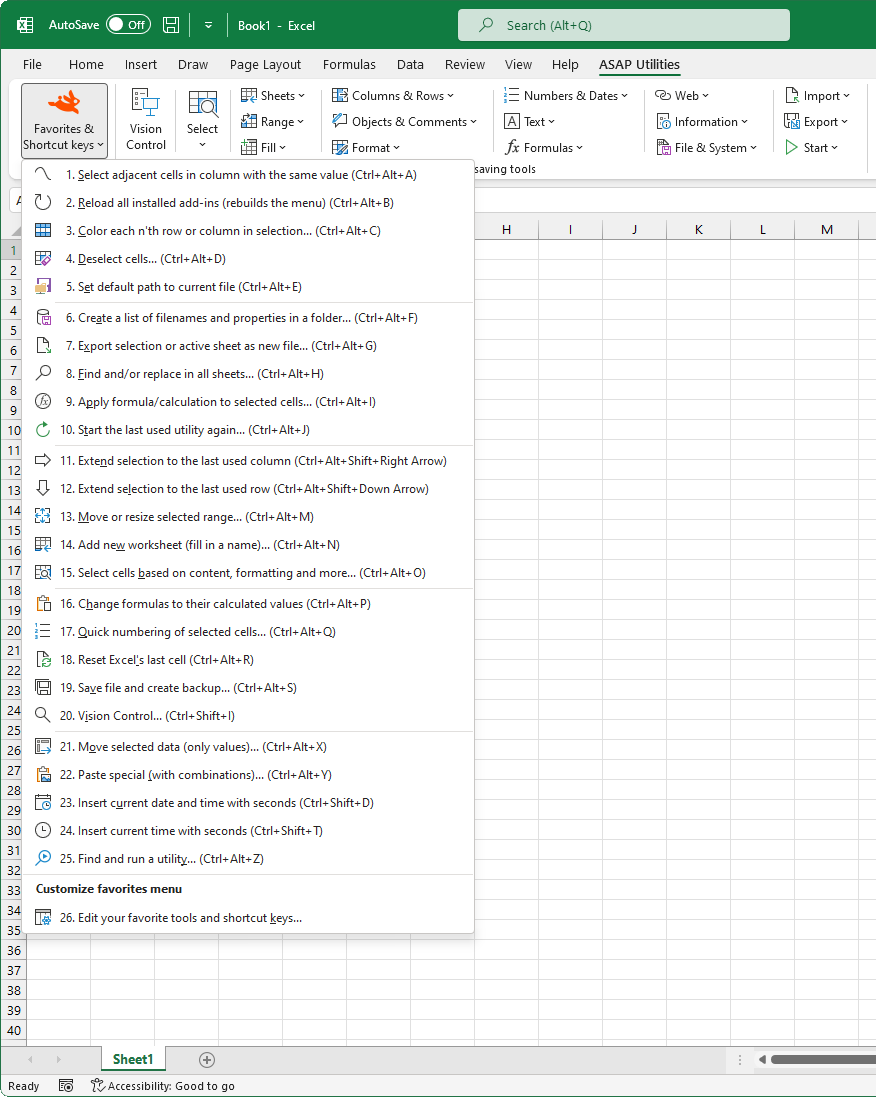
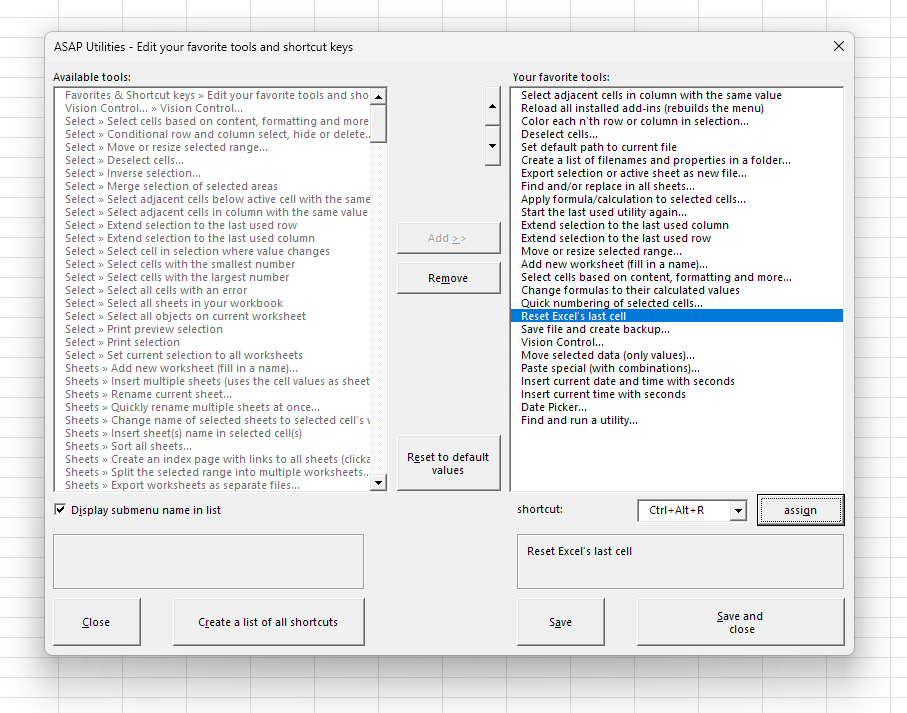
You can make a personal list of your most-used tools and set your own shortcut keys in Excel. This helps you save time by reducing the need for repetitive clicking and searching through menus, allowing you to focus more on your data.
By default, the following tools and shortcuts are included:
- Control+Alt+A: Select Adjacent Matching Cells in the Column
- Control+Alt+B: Reload Installed Excel Add-ins (Refresh Menus and Commands)
- Control+Alt+C: Color Every nth Row or Column in Selection...
- Control+Alt+D: Deselect Cells...
- Control+Alt+E: Set Temporary Default File Location to Current Folder
- Control+Alt+F: List File Names and Properties from Folder...
- Control+Alt+G: Export Selection or Sheet to New File (Excel, PDF, TXT, CSV, etc.)...
- Control+Alt+H: Advanced Find and Replace...
- Control+Alt+I: Apply Calculation to Selected Cells...
- Control+Alt+J: Start the Last Used Tool Again...
- Control+Alt+Shift+→: Extend Selection to the Rightmost Used Column
- Control+Alt+Shift+↓: Extend Selection to the Lowest Used Row
- Control+Alt+M: Move, Extend, or Shrink Range Selections...
- Control+Alt+N: Quickly Insert a Named Worksheet...
- Control+Alt+O: Advanced Criteria-Based Cell Selection...
- Control+Alt+P: Convert Formulas in Selection to Static Values
- Control+Alt+Q: Auto Numbering and Labeling of Selected Cells...
- Control+Alt+R: Reset Last Cell to Fix Control+End Behavior...
- Control+Alt+S: Save File and Create Backup Copy with Timestamp...
- Control+Shift+I: Display & Navigation...
- Control+Alt+X: Cut and Paste as Values (Keeping Dependents Unchanged)...
- Control+Alt+Y: Paste Special with Combined Options...
- Control+Shift+D: Insert Current Date and Time with Seconds
- Control+Shift+T: Insert Current Time with Seconds
- Control+Alt+T: Insert Date Using a Calendar Popup...
- Control+Alt+Shift+C: Clean Up Data and Formatting...
- Control+Alt+Shift+D: Count Duplicate Values in Selection (Optional Coloring)...
- Control+Alt+Shift+U: Change to UPPERCASE
- Control+Alt+Shift+T: Remove Leading and Trailing Spaces
- Control+Alt+Shift+N: Convert Numbers Stored as Text to Real Numbers
- Control+Alt+Z: Find and Run a Tool...
You can edit, remove, or add tools and shortcuts to match your workflow.
Starting this tool
Specify a Keyboard Shortcut: ASAP Utilities › My Tools & Shortcuts › Manage My Tools & Shortcuts...
Example screenshot: 2 Change your favorite utilities and assign your own shortcut (Here's the English version.)
Additional keywords to help you find this tool:
Favorite tools, Favorites, Hotkey, Shortcut, Keyboard shortcuts, Custom keyboard shortcuts, Accelerator key, Shortcut key, Key binding, Key combo, Custom key combo, Assign shortcut keys, Personalize shortcut keys, Excel shortcut customization, Manage favorite tools, Favorite tools shortcuts, Workflow accelerator
Tip:Alt+P for the previous tool.
Tip: Alt+N for the next tool.

Save Time in Excel. The Easy Way.
ASAP Utilities helps you save time and do what Excel alone can't.
You can get started right away. No training needed.
Most users start with a few tools. Many end up using ASAP Utilities daily.
Used by teams in 28,500+ organizations.
Get Started with ASAP Utilities
Start saving time in Excel with practical tools you can use right away.
-
No sign-up required.
-
-
Free 90-day trial