


Insert US English Formula and Convert to Local Format...
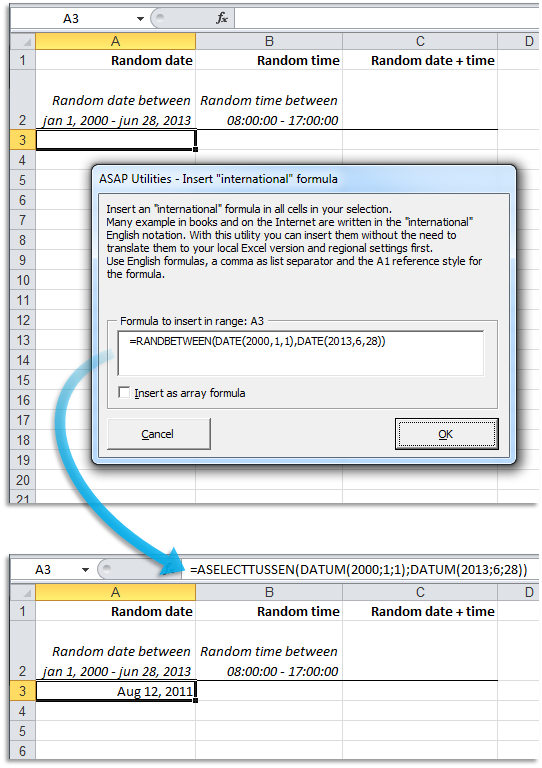
This tool lets you enter a formula using US English notation. This type of formula is often referred to as an international Excel formula because it's the format used in most tutorials, videos, websites, and forums.
It automatically converts your formula and inserts it into your selected cells using your local Excel language and regional settings.
A pop-up input box will appear where you can type or paste a formula using:
- English function names such as SUMIF, DATE, or RANDBETWEEN
- A comma (,) as the list separator
- A point (.) as the decimal separator
ASAP Utilities translates the formula into the correct format for your Excel version, so you no longer need to manually adjust function names, separators, or decimal characters.
For example, if you're using a non-English version of Excel and enter the formula "=SUMIF(A1:A5,">5")*1.2", it will be automatically converted based on your Excel language and settings.
Examples of localized conversions of =SUMIF(A1:A5,">5")*1.2:
- German (Deutsch): =SUMMEWENN(A1:A5;">5")*1,2
- Spanish (Español): =SUMAR.SI(A1:A5;">5")*1,2
- French (Français): =SOMME.SI(A1:A5;">5")*1,2
- Italian (Italiano): =SOMMA.SE(A1:A5;">5")*1,2
- Dutch (Nederlands): =SOM.ALS(A1:A5;">5")*1,2
- Portuguese (Português do Brasil): =SOMA.SE(A1:A5;">5")*1,2
You can also choose to insert the formula as an array formula.
This tool is especially helpful when copying formulas from websites, tutorials, videos, or books that use the US English format, without worrying about compatibility with your version of Excel.
Starting this tool
Specify a Keyboard Shortcut: ASAP Utilities › My Tools & Shortcuts › Manage My Tools & Shortcuts...
Additional keywords to help you find this tool:
Convert English Excel formula, Convert international formula, Use English formula in local Excel, Insert international formula, Excel formula language converter, Translate formula functions, Formula localization tool, Change formula to local version, Excel SUMIF not working in local version, Paste US Excel formula in non-English Excel, Convert formula separators, Convert comma to semicolon, Convert decimal point to comma, Convert English function names, Insert US formula, Translate Excel formula automatically, Excel international formula support, Excel formula converter
Tip:Alt+P for the previous tool.
Tip: Alt+N for the next tool.

Save Time in Excel. The Easy Way.
ASAP Utilities helps you save time and do what Excel alone can't.
You can get started right away. No training needed.
Most users start with a few tools. Many end up using ASAP Utilities daily.
Used by teams in 28,500+ organizations.
Get Started with ASAP Utilities
Start saving time in Excel with practical tools you can use right away.
-
No sign-up required.
-
-
Free 90-day trial