


Open Save As Dialog with First Cell as Suggested File Name...
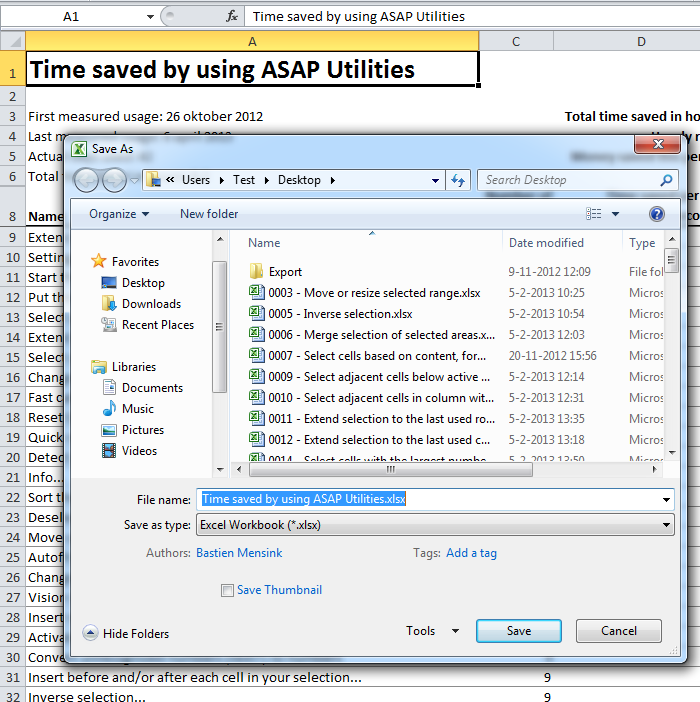
This tool opens Excel's Save As dialog and uses the value of the first filled cell on your worksheet as the suggested file name.
It's useful when saving reports, quotes, invoices, or templates where the first cell contains a project name, client reference, report title, or date.
This helps reduce typing, save time, and keep your file names more consistent and descriptive.
Starting this tool
Specify a Keyboard Shortcut: ASAP Utilities › My Tools & Shortcuts › Manage My Tools & Shortcuts...
Additional keywords to help you find this tool:
save file as from cell, Excel suggested filename, use cell as filename, save as dialog Excel, first cell value filename, auto filename from worksheet, file naming tool Excel, generate filename from cell, export with custom filename, Excel save tool, automate file naming, save report with cell value, fill file name from cell content
Tip:Alt+P for the previous tool.
Tip: Alt+N for the next tool.

Save Time in Excel. The Easy Way.
ASAP Utilities helps you save time and do what Excel alone can't.
You can get started right away. No training needed.
Most users start with a few tools. Many end up using ASAP Utilities daily.
Used by teams in 28,500+ organizations.
Get Started with ASAP Utilities
Start saving time in Excel with practical tools you can use right away.
-
No sign-up required.
-
-
Free 90-day trial