


Quickly Rename Multiple Sheets at Once...
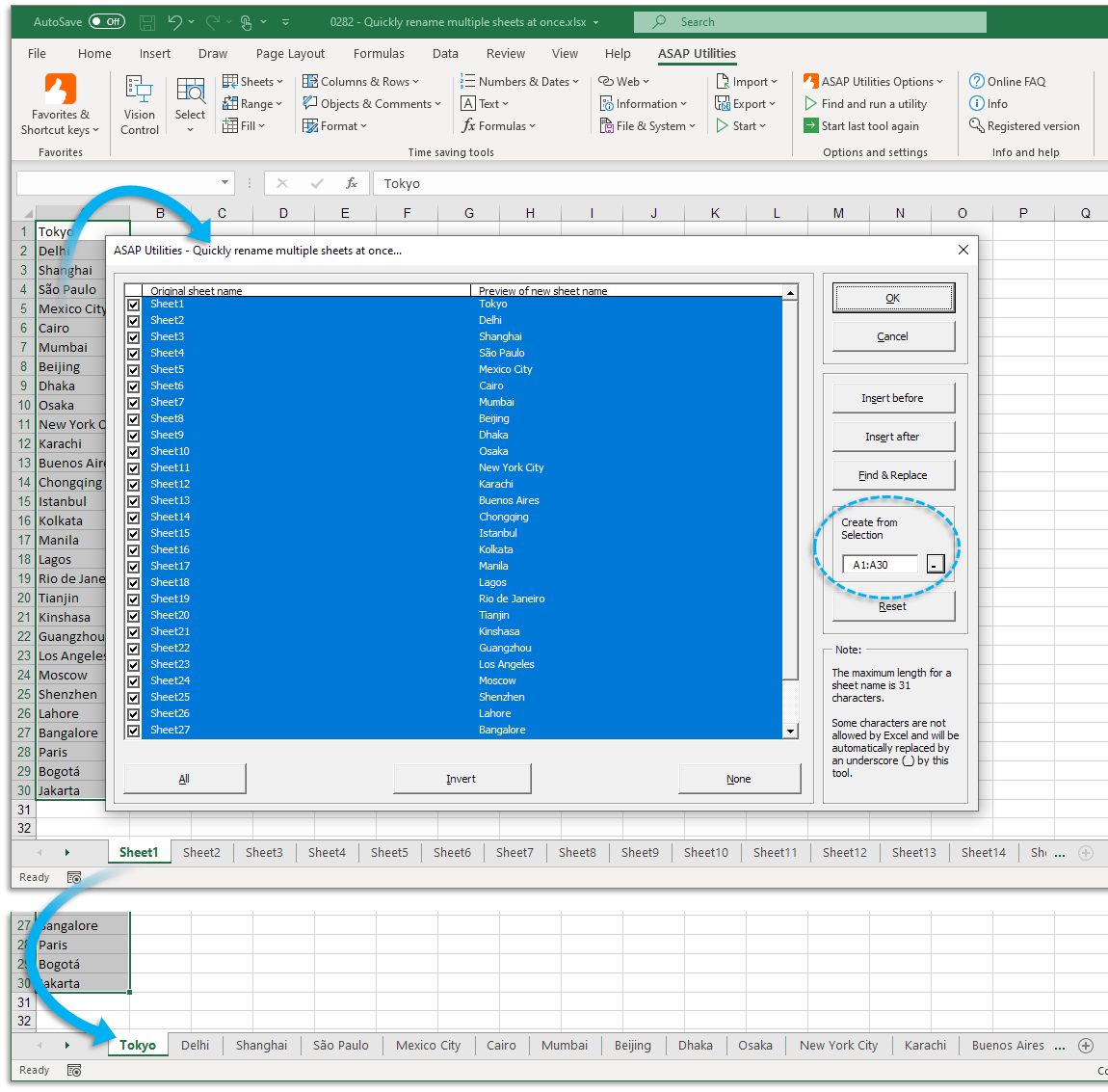
This tool lets you rename multiple sheets in your workbook all at once, saving you time and effort, especially when working with large files.
You can:
- Use Find & Replace to modify existing sheet names
- Insert text before or after the current sheet names
- Generate new names automatically from a selected range of cells
- Preview all changes before applying them
Each selected sheet will be listed with a side-by-side preview showing its current and new name, so you can see exactly what will change.
Using clear and consistent sheet names makes your workbook easier to understand, especially when sharing it with others or managing many sheets.
This tool helps you rename sheets in bulk based on patterns or data much faster than renaming them one at a time.
For example:
- Use Find & Replace to rename "Report Q1", "Report Q2" to "Summary Q1", "Summary Q2"
- Insert a prefix like "2024_" to turn "Sales", "Budget" into "2024_Sales", "2024_Budget"
- Insert a suffix like "_Final" to mark completed sheets (e.g., "Overview" becomes "Overview_Final")
- Rename sheets based on a list of names in your worksheet, such as customer names or months
This is especially helpful when:
- You need to clean up default sheet names (e.g., Sheet1, Sheet2, etc.)
- You're preparing a file for clients or teams with meaningful sheet names
- You want to apply consistent naming conventions quickly
Note:
- The maximum length for a sheet name in Excel is 31 characters.
- If you use a character that Excel does not allow in sheet names, it will automatically be replaced with an underscore (_).
Tip:
To create multiple new sheets with meaningful names, consider using our "Insert Multiple Sheets Using Cell Values as Names..." tool.
Starting this tool
Specify a Keyboard Shortcut: ASAP Utilities › My Tools & Shortcuts › Manage My Tools & Shortcuts...
Additional keywords to help you find this tool:
rename multiple sheets, batch rename Excel sheets, Excel rename worksheets in bulk, rename all sheet tabs, find and replace sheet names, Excel rename sheets from cell values, add prefix to sheet names, add suffix to sheet names, rename tabs using list, update sheet names at once, mass rename sheet tabs, rename Excel tabs automatically, rename worksheets using data range, quickly change sheet names
Tip:Alt+P for the previous tool.
Tip: Alt+N for the next tool.

Save Time in Excel. The Easy Way.
ASAP Utilities helps you save time and do what Excel alone can't.
You can get started right away. No training needed.
Most users start with a few tools. Many end up using ASAP Utilities daily.
Used by teams in 28,500+ organizations.
Get Started with ASAP Utilities
Start saving time in Excel with practical tools you can use right away.
-
No sign-up required.
-
-
Free 90-day trial