


Insert Date Using a Calendar Popup...
This tool opens a calendar popup (date picker) that lets you quickly insert a date into the selected cell without typing.
The calendar displays the full date context at a glance: day, month, year, weekday name, and ISO week number. This makes it easy to look up, verify, and insert dates accurately.
Key Features:
- Click a date on the calendar to insert it into the selected cell.
- Browse by month and year to find the correct date.
- Automatically applies your system's short date format if the cell isn't already formatted as a date.
- Option to start the calendar on today's date or the date in the selected cell.
- Enable it to appear when double-clicking a date or date-formatted cell.
- Choose your preferred starting day of the week (Monday, Sunday, or Saturday).
- View ISO week numbers on the calendar.
- Option to move to the next cell or close the popup after inserting a date.
- Keep the calendar floating while you move through your worksheet.
- Close the popup with the ESC key or the X button.
Benefits:
- Prevents manual entry errors and inconsistent date formats.
- Makes it easier to look up and insert dates, such as next Friday or the first Monday of next month.
- Helps users who are unfamiliar with date formatting in Excel.
- Saves time when working with date-driven tasks like schedules, forms, or reports.
Tip:
By default, you can use the shortcut Control+Alt+T to quickly open the Calendar Popup.
Starting this tool
Specify a Keyboard Shortcut: ASAP Utilities › My Tools & Shortcuts › Manage My Tools & Shortcuts...
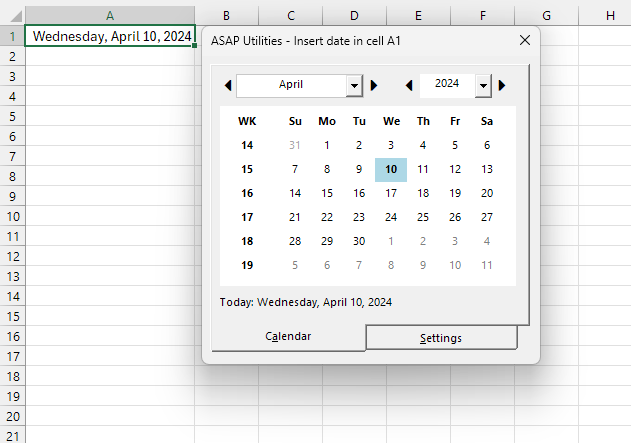
Example screenshot: 2 (Here's the English version.)
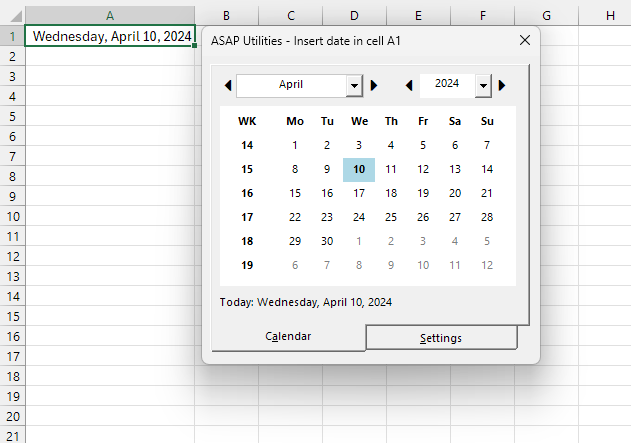
Example screenshot: 3 (Here's the English version.)
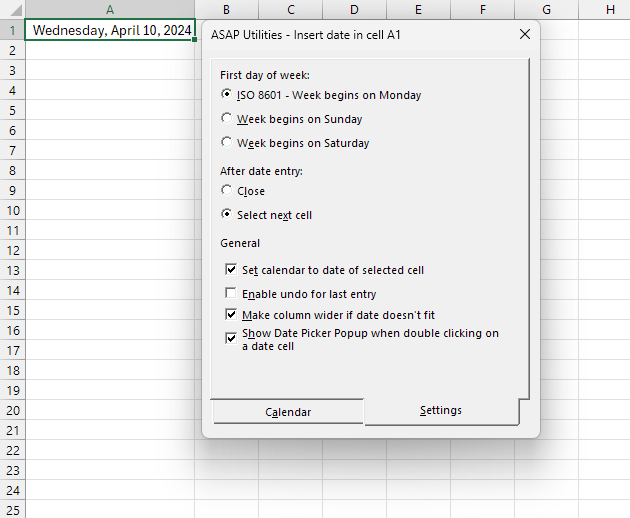
Additional keywords to help you find this tool:
date entry, Excel calendar tool, select date without typing, visual date selector, Excel calendar widget, date input helper, Excel date selection, pick date in Excel, accurate date entry, avoid date errors, Excel ISO week, calendar view Excel, easier date lookup, Excel weekday display
Tip:Alt+P for the previous tool.
Tip: Alt+N for the next tool.

Save Time in Excel. The Easy Way.
ASAP Utilities helps you save time and do what Excel alone can't.
You can get started right away. No training needed.
Most users start with a few tools. Many end up using ASAP Utilities daily.
Used by teams in 28,500+ organizations.
Get Started with ASAP Utilities
Start saving time in Excel with practical tools you can use right away.
-
No sign-up required.
-
-
Free 90-day trial