


Replace Formula Errors with a Custom Message...
Turn confusing formula errors into helpful messages or hide them completely.
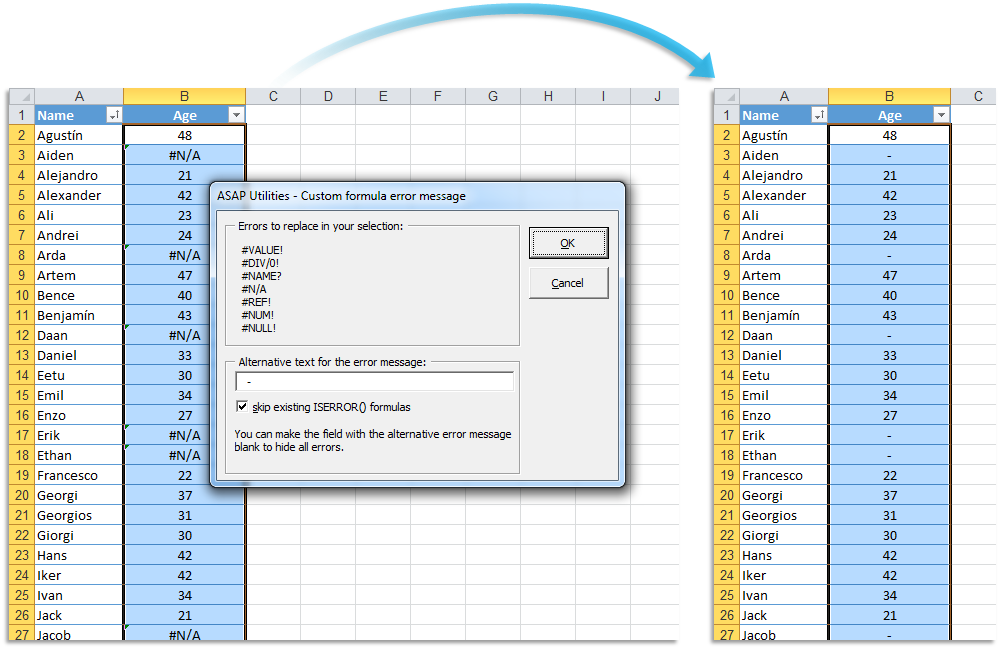
Instead of displaying standard Excel error values like #N/A, #VALUE!, or #DIV/0!, this tool allows you to automatically replace them with your own text or leave them blank.
For example, if a formula like =A1*B1 returns #VALUE! because one of the cells contains text instead of a number, you can replace it with a user-friendly message like "Invalid input" or simply show a blank cell.
You can do this manually, but it is easier and faster with the help of this tool.
This tool:
- Automatically wraps existing formulas with =IFERROR(your_formula, your_custom_message)
- Works on multiple formulas at once, even if they are different
- Avoids manual edits, making formula management easier
Make your spreadsheets cleaner and easier to read by controlling what users see when formulas return errors.
Starting this tool
Specify a Keyboard Shortcut: ASAP Utilities › My Tools & Shortcuts › Manage My Tools & Shortcuts...
Additional keywords to help you find this tool:
Excel IFERROR function, Custom error messages, Handle Excel formula errors, Replace #N/A with custom text, Fix #VALUE! error in Excel, Suppress #DIV/0! error, Excel error handling techniques, Display blank instead of error in Excel, Prevent #REF! error in formulas, Using IFERROR with VLOOKUP, Trap errors in Excel formulas, Error-proofing Excel spreadsheets, Customizing Excel error values
Tip:Alt+P for the previous tool.
Tip: Alt+N for the next tool.

Save Time in Excel. The Easy Way.
ASAP Utilities helps you save time and do what Excel alone can't.
You can get started right away. No training needed.
Most users start with a few tools. Many end up using ASAP Utilities daily.
Used by teams in 28,500+ organizations.
Get Started with ASAP Utilities
Start saving time in Excel with practical tools you can use right away.
-
No sign-up required.
-
-
Free 90-day trial