


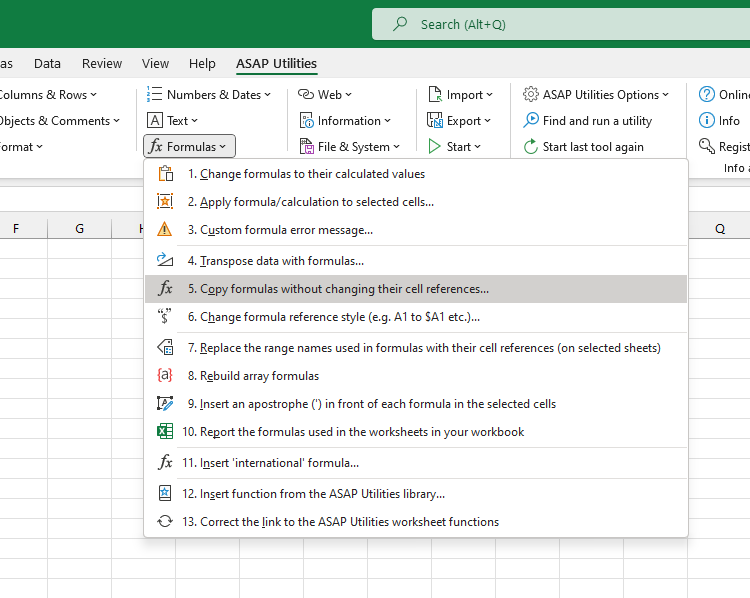
Copy Formulas Without Changing Their Cell References...
This tool copies all formulas and values in your selection exactly as they are, without adjusting the cell references.
Normally, when you copy a formula, Excel automatically changes the cell references relative to the new location. With this tool, you can copy your formulas to another location while keeping the original references intact, eliminating the need to manually add dollar signs to change to mixed or absolute referencing (for example, converting A1 to $A$1).
In addition to formulas and values, this tool also copies any cell formatting, comments, and data validation settings.
Starting this tool
Specify a Keyboard Shortcut: ASAP Utilities › My Tools & Shortcuts › Manage My Tools & Shortcuts...
Additional keywords to help you find this tool:
Preserve cell references when copying formulas, Copy formulas with relative, absolute, and mixed references intact, Excel copy formulas as-is, Copy formulas exactly as shown in Excel, Retain original cell references when copying formulas, Copy formulas without adjusting references, Maintain cell references during formula copy, Copy formulas without converting to dollar signs, Copy formulas without relative reference changes
Tip:Alt+P for the previous tool.
Tip: Alt+N for the next tool.

Save Time in Excel. The Easy Way.
ASAP Utilities helps you save time and do what Excel alone can't.
You can get started right away. No training needed.
Most users start with a few tools. Many end up using ASAP Utilities daily.
Used by teams in 28,500+ organizations.
Get Started with ASAP Utilities
Start saving time in Excel with practical tools you can use right away.
-
No sign-up required.
-
-
Free 90-day trial