


Copy and Transpose Without Changing Formula References...
This tool copies and transposes your data while preserving the cell references in your formulas.
Unlike Excel's standard transpose function, which adjusts cell references when data is shifted, this tool keeps your formula references intact. It makes it easy to reorganize your data without reworking your formulas.
Starting this tool
Specify a Keyboard Shortcut: ASAP Utilities › My Tools & Shortcuts › Manage My Tools & Shortcuts...

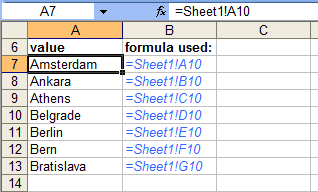
Example screenshot: 2 The result, all cell references have been preserved (Here's the English version.)
Additional keywords to help you find this tool:
Transpose data with formulas, Transpose data preserve references, Formula-preserving data transpose, Transpose data without changing cell references, Preserve formula references in transpose, Transpose data in Excel with formula integrity, Transpose Excel data and maintain formulas
Tip:Alt+P for the previous tool.
Tip: Alt+N for the next tool.

Save Time in Excel. The Easy Way.
ASAP Utilities helps you save time and do what Excel alone can't.
You can get started right away. No training needed.
Most users start with a few tools. Many end up using ASAP Utilities daily.
Used by teams in 28,500+ organizations.
Get Started with ASAP Utilities
Start saving time in Excel with practical tools you can use right away.
-
No sign-up required.
-
-
Free 90-day trial