


Clear Duplicate Values in Selection (Keep One Original)
This tool removes duplicate values in your selected range while keeping one original. The first occurrence of each value is preserved, and all later instances are cleared.
You can choose whether the comparison should be case-sensitive.
Note:
If your selection includes formulas, the tool compares their calculated values. For example, a cell with the value 12 and a cell with the formula =3*4 are considered duplicates.
Starting this tool
Specify a Keyboard Shortcut: ASAP Utilities › My Tools & Shortcuts › Manage My Tools & Shortcuts...
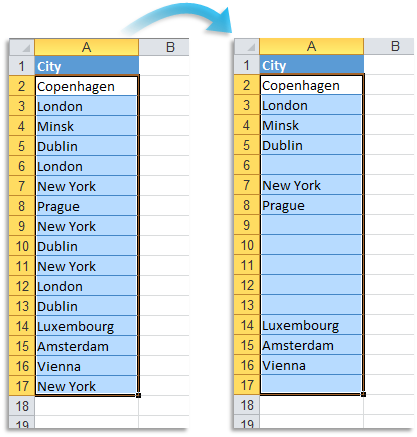
Example screenshot: 2 (Here's the English version.)
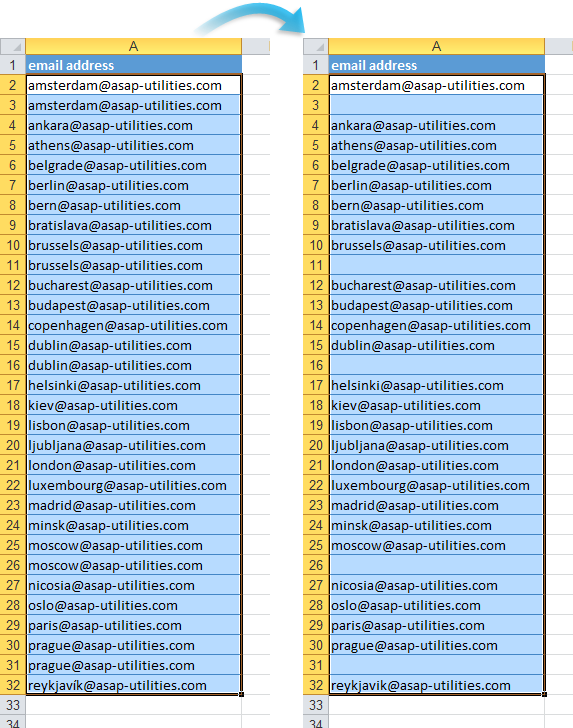
Additional keywords to help you find this tool:
Remove duplicate entries in Excel, Deduplicate selected cells, Duplicate removal tool, Dedupe, Delete duplicate cells, Clear duplicate cells (keep one original), Remove duplicate data in Excel, Double values removal, Clear double entries, Remove duplication in selection, Eliminate double entries, Undouble list in Excel, Clear doubles in selection
Tip:Alt+P for the previous tool.
Tip: Alt+N for the next tool.

Save Time in Excel. The Easy Way.
ASAP Utilities helps you save time and do what Excel alone can't.
You can get started right away. No training needed.
Most users start with a few tools. Many end up using ASAP Utilities daily.
Used by teams in 28,500+ organizations.
Get Started with ASAP Utilities
Start saving time in Excel with practical tools you can use right away.
-
No sign-up required.
-
-
Free 90-day trial