
The ASAP Utilities menu in Excel (English)
Activate hyperlinks (create from cell values)...
English (us) ⁄ Nederlands ⁄ Deutsch ⁄ Español ⁄ Français ⁄ Português do Brasil ⁄ Italiano ⁄ Русский ⁄ 中文(简体) ⁄ 日本語Web › 5. Activate hyperlinks (create from cell values)...
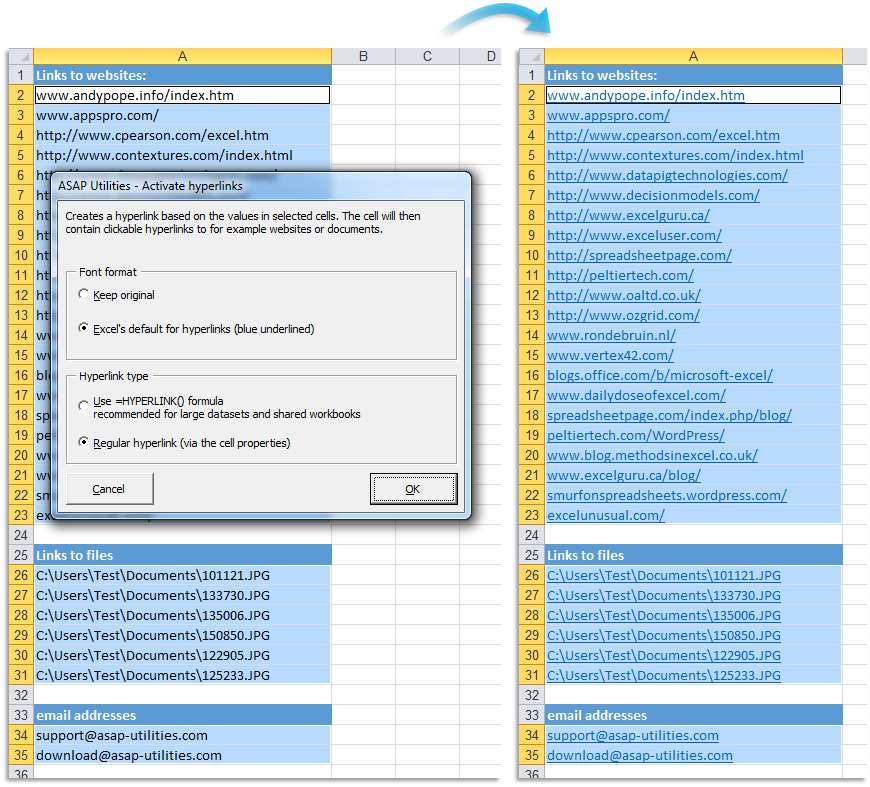
This utility adds a hyperlink in the selected cells based on content of the cell.You can use this for example to transform website- or email addresses into clickable hyperlinks.
You can configure the following settings:
Font format:
Hyperlink type:
Your last used settings will be remembered.
Screenshots
Starting this tool
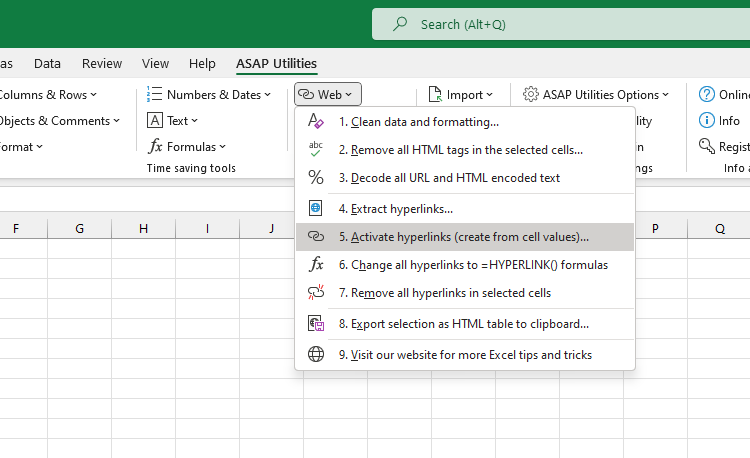
- Click ASAP Utilities › Web › 5. Activate hyperlinks (create from cell values)...
- Specify a Keyboard Shortcut: ASAP Utilities › Favorites & Shortcut keys › Edit your favorite tools and shortcut keys...
Additional keywords for this tool:
reactivate hyperlinks, convert hyperlinks
reactivate hyperlinks, convert hyperlinks
©1999-2024 ∙ ASAP Utilities ∙ A Must in Every Office BV ∙ The Netherlands
Empowering Excel Users Worldwide for 25 Years
Empowering Excel Users Worldwide for 25 Years