
The ASAP Utilities menu in Excel (English)
Decode all URL and HTML encoded text
English (us) ⁄ Nederlands ⁄ Deutsch ⁄ Español ⁄ Français ⁄ Português do Brasil ⁄ Italiano ⁄ Русский ⁄ 中文(简体) ⁄ 日本語Web › 3. Decode all URL and HTML encoded text
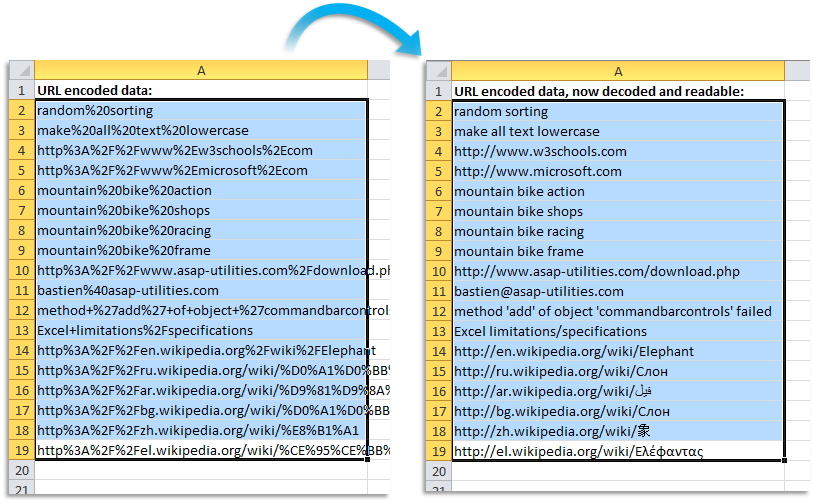
This utility decodes all URL-encoded text in your selected cells.This can be useful when you use Excel for example to analyze reports with website statistics or keyword performances.
The utility will replace the "+" character with a space and it decodes any %## encoded character in the cells.
It will also decode named HTML entities such as and € and it will decode a string of text such as %c3%84 and %c3%a7 and unicode characters such as © and “.
This utility will for example decode the text "http%3A%2F%2Fwww%2Emicrosoft%2Ecom" to "http://www.microsoft.com", which is more readable.
URL encoding is used when text is place in a query string in the URL to avoid that it gets mixed up with the address of the website and it is usually placed behind a question mark (?) in the address. This technique is often used when the internet browser sends data via a form on the website to the web server.
The cells in your selection with formulas are skipped.
Screenshots
Starting this tool
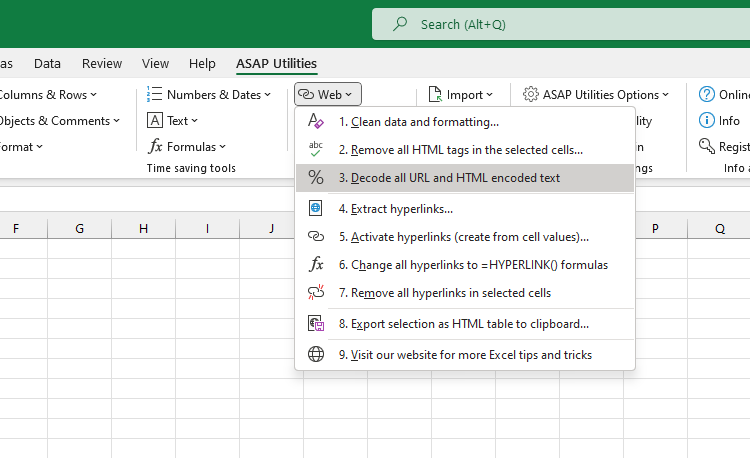
- Click ASAP Utilities › Web › 3. Decode all URL and HTML encoded text
- Specify a Keyboard Shortcut: ASAP Utilities › Favorites & Shortcut keys › Edit your favorite tools and shortcut keys...
Additional keywords for this tool:
urldecode, excel php alternative, decode string, decode website address, percent-encoding, uri, Internationalized Resource Identifier, Uniform Resource Locator (URL), decode google analytics search keywords, urlencoded, hyperlink, convert html encoded characters
urldecode, excel php alternative, decode string, decode website address, percent-encoding, uri, Internationalized Resource Identifier, Uniform Resource Locator (URL), decode google analytics search keywords, urlencoded, hyperlink, convert html encoded characters
©1999-2024 ∙ ASAP Utilities ∙ A Must in Every Office BV ∙ The Netherlands
Empowering Excel Users Worldwide for 25 Years
Empowering Excel Users Worldwide for 25 Years