
ASAP Utilities new version 3.10 released
Published: June 28, 2005reference id: QA0051
Version 3.10 fixes some annoying bugs (that were introduced or discovered in version 3.09) and contains new improvements.
My thanks goes out to each and every one of you for your support, help and tips. Unfortunately we're not able to reply to all the emails we receive, but we read them all.
Click here to go to the download page.
ASAP Utilities is (as always) free and contains no spyware !
We make you the company's excel guru!
What's new in 3.10:
- Select ? Conditional select
We've added the possibility to select:
. number (constant), e.g. 12
. number (formula), e.g. =12*2.20371
. number (link to sheet), e.g. =sheet1!A1
. number (link to file), e.g. ='[Test alignment.xls]Sheet1'!$A$1 - Range ? Remove empty rows
This could already be accomplished with the SELECT ? Conditional row and column select, hide or delete function, but it is now available as a single utility. - Columns/Rows ? Color each n'th row or column.
Now remembers your last used color. - Columns/Rows ? Merge column data (join cells)
You can now specify how to handle empty cells. You can also specify if the cells have to be treated as formulas, values or formatted text. I've also added the option to merge with the tab- character of use a line-break.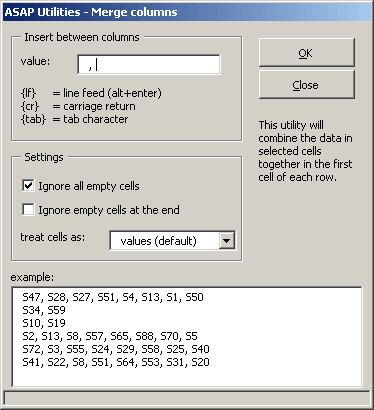
- Text ? Insert before/after
Improved combined insert before and/or after An apostrophe can now also be inserted before. This can be handy when you want do display your formulas as text.
You can also specify if the cells have to be treated as formulas, values or formatted text.
You can exclude hidden cells. (comes in handy when you're working with filtered ranges).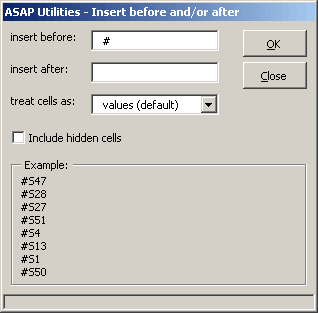
- Fill ? Quicknumber numbering of cells
The cells were always aligned right. This is now optional. - Format ? Wrap text
Wraps the text in selected cells, which makes long lines break into multiple lines. - Format ? Unwrap text
Unwraps the text in selected cells. - Web ? Clean webimported data
Added the option to remove all cell-borders. - Web ? Extract hyperlinks
Extracts the hyperlink-address of the cell. This value can be placed in the cell itself or in the column next to it. - Export ? Export selection or active sheet a new file
Export range as picture, the image size has been expanded from 800x600 px to a maximum of 5000x5000 px - Several small additions.
- False Virus alert in sytem.asap Gone ?
Some virusscanners reported a virus in the file system.asap.
Of course ASAP Utilities is virus-free, but it caused a lot of "stress".
The reason was caused by the codeline: insertline() which was in the System ? Macro/VBA information ? Code washer part. Here you can choose to remove empty lines, commentlines and the indentation from your vba modules. Do do this we used the .insertline() command. Since this caused some virusscanners to panic, we've used another approach to accomplish the same result. - Menu error
Fixed problems that could occur when the location of the favorites menu could not be found or was not properly set. - Selection
Fixed an annoying bug that sometimes caused to change the selection of your cells. This could happen when you selected the entire sheet or entire columns or rows. - System ? Remove all macros/VBA from current file
On some systems this produced a compile error. This is now solved (at least on my test-systems). - Objects/Comments ? Comment tools
There was a bug in the "Create report in new file" feature as comments are reported (incorrect) multiple times: Comments of the first sheet were printed again as comments belonging to the second sheet if the second sheet does not contain any comments itself. The wrong duplicates were repeated until a sheet contained a comment again. - Export ? HTML export
Fixed a combination that produced incorrect HTML tags (color outside <TD>tag) - Export ? Export selection or active sheet a new file
Fixed the bug that produced an error in Excel 2003 "The command could not be completed by using the range specified. Select a single cell within the range and try the command again."
« back
©1999-2026 ∙ ASAP Utilities ∙ A Must in Every Office BV ∙ The Netherlands
🏆 Winner of the "Best Microsoft Excel Add-in" Award at the Global Excel Summit 2025 in London!
For over 26 years, ASAP Utilities has helped users worldwide save time and do what Excel alone cannot.
🏆 Winner of the "Best Microsoft Excel Add-in" Award at the Global Excel Summit 2025 in London!
For over 26 years, ASAP Utilities has helped users worldwide save time and do what Excel alone cannot.