


Cette page est actuellement disponible uniquement en anglais.
ASAP Utilities released its new version (4.0) today!
August 30, 2006
We're proud to officially announce the new version of ASAP Utilities!
Version 4.0 is compatible with Excel 2000 and all future Excel versions. This new version has a lot of improvements in comparison to the previous version 3.10c.
A comprehensive User Guide will show you how to get the best out of ASAP Utilities. This 141 pages document can be downloaded as PDF.
My thanks goes out to each and every one of you for your suggestions and bug-reports the past years. ASAP Utilities continues to grow and improve thanks to your support, your suggestions and your encouragement.
ASAP Utilities is (as always) free and contains no spyware!
Kind regards,
Bastien Mensink
ASAP Utilities
The major changes in this new version 4.0
- ASAP Utilities is now partly a COM Add-in (ASAP Utilities.dll).
This gives some substantial benefits:- Excel's startup with ASAP Utilities is (much) faster.
- The utilities run faster
- We previously had split the utility into several files (sheet.asap, format.asap, etc.). Whenever a utility was run the first time from one of these files, the file had to be opened, which in some cases caused some delay due to a virus scanner or slow network. This is gone now which improves speed.
- The code is easier to maintain for us and upgrades can be provided much quicker.
- Control+Shift shortcuts can be used (again) in the favorites menu.
The only disadvantage is that Excel 97 is not supported by this new version. We will create a special version for the people that still use Excel 97.
- Expanded undo.
Much more utilities now can be undone. - Range » Advanced sort... (new)
Extend the sorting capabilities of Excel. You can now sort on 5 columns and we have extended the characteristics to sort on.
You can sort on:- Value
- Number Format
- Cell Color
- Cell Color Indexnr.
- Font Color
- Font Color Indexnr.
- Font Size
- Font Name
- Bold
- Italic
- Underline
- Strikethrough
- Text length
- Shuffle (randomize order)
- Formula
- Email address host (@...)
- Year-Month-Day
- Year-Day-Month
- Month-Day-Year
- Month-Year-Day
- Day-Year-Month
- Day-Month-Year
- Range » Apply formula (improved)
Better error handling and detection for formulas that result in a circular reference. - Export » Export selected chart or range as image (file)...
Now also supports the vector format EMF. Vector graphics in EMF (enhanced version of WMF) format can be scaled and fully edited in MS Office and other Windows applications. They generally produce the best quality for printing. - Updated Menu
The shortcuts assigned in the favorites menu will now also be displayed in the rest of the menu. Utilities that require additional input or show a form are now recognizable in the menu by the dots at the end of the description ... - Hyperlink in cell to hyperlink 2 click
Has been renamed to make more clear what it does: "Activate hyperlinks (create from cell-value)" - General
I've added an option to switch on/off the question that sometimes is asked before running the utility, e.g. questions like "Do you want to convert all text characters in selected cells to UPPERCASE?" can now be turned off in the ASAP Utilities » ASAP » Options dialog. - Web » Clean Web Imported data...
The layout is improved. Your last used settings will be remembered.
Fixed the bug that could incorrectly convert dates. These cells are now skipped. - Export » Export selection as HTML table to clipboard...
Your last used settings will be remembered.
< STRIKE > is added for text that is formatted as strikethrough.
Works much faster on large tables (> 500 cells).
The HTML code is improved, partly because current browsers support CSS better. - Export » Export selection or active sheet as new file...
Your last used settings will be remembered. - Export » Export selected chart or range as image (file)...
Your last used settings will be remembered. - Sheets » Protect all sheets
It also has the option to protect only selected or all sheets. - Sheets » Unprotect all sheets
It also has the option to unprotect only selected or all sheets. - Format » Copy a sheet's page and print settings...
The settings for "fit pages" (x pages with and x pages wide) can now be copied too. - Text » Convert dates...
Your last used settings will be remembered. - Text » Make first character uppercase, the rest lowercase
Makes the first character uppercase and the rest of the text lowercase: for example BASTIEN will become Bastien. - Sheets » Export worksheets as separate files...
Save worksheets as separate files in a folder you select. - Web » Extract hyperlinks
Hyperlinks from shapes/images can now be extracted too. - Text » Advanced character removal
Besides removing the characters you can now also have them replaced with a
certain character. - Select » Expand selection to last row
The last cell will be reset first before expanding your selection to the last row.
Will now also work on protected worksheets. - Select » Expand selection to last column
The last cell will be reset first before expanding your selection to the last column.
Will now also work on protected worksheets. - Export » Export selection as values to clipboard
Will give you a warning message if your selection contains cells with an
error. You can then choose to continue or correct the errors first. - System » Close all files except the current one
Has been renamed to:
System » Close multiple files at once... - General
Improved progress indicators. - Numbers » Change decimals (not formatting, but changing)
Has been renamed to
Numbers » Round numbers (not formatting, but changing)... - Range » Empty duplicates on selection.
Now works on multiple columns. Cells with more than 255 characters are now
supported too. - Fill » Insert filename...
Now has an extra option to create hyperlinks to the files. A copy of this utility
has been made in the "Information" menu with the name "List filenames in folder..."
Your settings will be saved and if you have Excel 2002/XP or later the "pick a folder"
dialog will start with your last used folder. - ASAP » Options...
A new option is added where you can choose to use the F11 key to switch between
fullscreen mode. By default the F11 key inserts a chart sheet in Excel and so
will Alt+F1. - NEW: System » Reopen current file without saving changes.
Closes the current workbook without saving changes and then opens the last saved
copy of the file. - NEW: Text » Replace accented vowels (á, ë, etc.)...
Replace the accented vowels in your selected cells with non-accented vowels.
For example replace ë, é, è, ê with the vowel e. In some cases the accented
characters are not allowed and now you can quickly replace these accented vowels.
You can customize the settings. - Text » Advanced character removal...
Contains a new option where you can specify whether you want to replace in cells with constants, formulas or both. - NEW: worksheet function =ASAPSPELLNUMBERS().
This is a worksheetfunction of the utility Numbers » Spell numbers or amounts (EN, DE, NL)...
A detailed description of this function is given in the User Guide. - System » Close and delete current file.
If possible the file will not be deleted but send to the Recycle Bin. If that is not
possible you will get a question of you want to delete the file permanently. - System » Create a lot of folders.
If you have Excel 2002/XP or later the "pick a folder" dialog will start with your last used folder. - Format » Delete all lines inside selection
Has been renamed to Delete all borders inside selection.
This utility has also been updated to really remove only the interior borders.
It used to remove all borders in your selection. - Excel 2007
This version will work in Excel 2007 beta too, although not all utilities have been fully tested in the new version of Excel (yet). - Sheets » Sort all sheets in alphabetical order
Used to sort only the worksheets. It now sorts all sheets. - NEW: Columns / Rows » Remove all empty columns
This utility will remove all empty columns in your selection. An empty column is defined as a column where none of the cells contains data. - Columns / Rows » Color each n'th row or column in selection...
Your last used settings will be remembered. - Import » Merge files together in a new file...
Your last used settings will be remembered, including your last used folder. - Range » Paste Special (with combinations)...
Your last used settings will be remembered. - Format » Copy a sheet's page and print settings...
Your last used settings will be remembered. - Range » Find / replace in all sheets...
Your last used settings will be remembered. - Formula » Custom formula error message...
Your last used settings will be remembered. - New worksheet formula: =ASAPSheetName()
Returns the name of the sheet the formula is placed on. - Fill » List filename...
When creating a list of all filenames in a folder you can now choose whether you want to list the filename including its full path or just the filename (without its folder). - All menu-items now have accelerator keys
An an accelerator key is a single character used as a shortcut for selecting the menu items. Pressing the ALT key, followed by the
accelerator key gives focus to the menu-item (submenu) or executes the menu-command.
The accelerator key is also called keyboard accelerator, shortcut key or keyboard shortcut. However they differ from the shortcuts you can use in theASAP Utilities favorites menu. The shortcuts there give instant access to start the utility while the accelerator keys just provide a more convenient way to browse through the menu. - New worksheet function: =ASAPExtractNumbers(ref)
This function extracts the numbers from a given range or value. - New worksheet function: =ASAPStripNumbers(ref)
This function strips the numbers from a given range or value. - Several small additions and improvements.
Bug fixes
- Information » Count duplicates in selection
- Now also handles cells with more than 255 characters correctly. It can now recognize cells with the maximum length of 32767 characters.
- Now supports multiple selected ranges (multiple areas)
- Select » Conditional select » duplicates
- Now also handles cells with more than 255 characters correctly. It can now recognize cells with the maximum length of 32767 characters.
- Select duplicates now works when you have selected multiple areas (non-adjacent cells).
- Information » Fast calculation
Better calculation of duplicates and unique values. It now also handles cells with more than 255 characters correctly. It can now recognize cells with the maximum length of 32767 characters.
- Objects/Comments » Delete all objects from current sheet
Remove objects handles form/VBA buttons better.
- Favorites menu
The cursor stays highlighted after you add or remove a tool.
The insert and delete button have an accelerator key (Alt+i and Alt+d)
Improved handling of the location of the favorites menu.
- Information » Count duplicates in selection.
In some cases duplicates weren't correctly found (numbers with decimals), and I think also depending on your computer settings (different from US/international).
- Fill » Fill 'between values' linear in selection (horizontal)
Didn't work, fixed it and is now working
- Fill » Copy values to empty cells below filled cells in selection
Resulted in an error when your selection included a cell in row number 1 and that cell was empty. This is now fixed.
- General
When you close Excel, and then chose "No", the ASAP Utilities menu was removed. This is now fixed. The ASAP Utilities menu will only be removed if you really closed down Excel.
- System » Rename current file...
When you use this tool to rename a template file (xlt) the renamed file was opened as a workbook based on the template. This is now corrected. The renamed template will be opened for editing.
- Text » Delete leading and trailing spaces
Fixed the bug that could incorrectly convert dates. These cells are now skipped.
- Text » Delete leading and trailing and excessive spaces
Fixed the bug that could incorrectly convert dates. These cells are now skipped.
- Range » Find / replace in all sheets...
Can now handle large text cells too that contain more than 255 characters.
- Text » Advanced character removal
Can now handle large text cells too that contain more than 255 characters.
- Select » Expand selection to last row
Now support multiple selected areas
- Select » Expand selection to last column
Now support multiple selected areas
- Select » Inverse selection
Produced an error if you cancelled the selection of a cell.
- Information » Count unique values in selection
Produced an error if your selection contained cells with an error.
- Numbers » Use a significant number of decimals
Gave an error when you used it on cells without decimals.
The speed of this utility is increased too.
- Range » Find / Replace in all sheets...
Bug fixed in combination with Excel 2003.
- System » Clear recent files list in file menu
Used to reset the amount of recent files back to Excel's default which is 4.
This is now fixed and your setting will be kept.
- Objects » Select all objects on current sheet
Gave an error if the sheet contained comments. A workaround has been made to make it work in that occasion too.
- System » Rename current file
If you specified a filename of a file that already existed that file was overwritten. ASAP Utilities will now ask you if you want to overwrite the
existing file. In Excel 2000 the utility made Excel crash when the renamed file was about to be openend. This is now fixed.
- Sheet » Copy a sheet’s page and print settings
Fixed a bug during the startup of the utility which caused the utility not to work.
- General
Several minor bug fixes.
Corrected some typing errors.
A few screenshots
- Now also handles cells with more than 255 characters correctly. It can now recognize cells with the maximum length of 32767 characters.
- Now supports multiple selected ranges (multiple areas)
- Now also handles cells with more than 255 characters correctly. It can now recognize cells with the maximum length of 32767 characters.
- Select duplicates now works when you have selected multiple areas (non-adjacent cells).
Better calculation of duplicates and unique values. It now also handles cells with more than 255 characters correctly. It can now recognize cells with the maximum length of 32767 characters.
Remove objects handles form/VBA buttons better.
The cursor stays highlighted after you add or remove a tool.
The insert and delete button have an accelerator key (Alt+i and Alt+d)
Improved handling of the location of the favorites menu.
In some cases duplicates weren't correctly found (numbers with decimals), and I think also depending on your computer settings (different from US/international).
Didn't work, fixed it and is now working
Resulted in an error when your selection included a cell in row number 1 and that cell was empty. This is now fixed.
When you close Excel, and then chose "No", the ASAP Utilities menu was removed. This is now fixed. The ASAP Utilities menu will only be removed if you really closed down Excel.
When you use this tool to rename a template file (xlt) the renamed file was opened as a workbook based on the template. This is now corrected. The renamed template will be opened for editing.
Fixed the bug that could incorrectly convert dates. These cells are now skipped.
Fixed the bug that could incorrectly convert dates. These cells are now skipped.
Can now handle large text cells too that contain more than 255 characters.
Can now handle large text cells too that contain more than 255 characters.
Now support multiple selected areas
Now support multiple selected areas
Produced an error if you cancelled the selection of a cell.
Produced an error if your selection contained cells with an error.
Gave an error when you used it on cells without decimals.
The speed of this utility is increased too.
Bug fixed in combination with Excel 2003.
Used to reset the amount of recent files back to Excel's default which is 4.
This is now fixed and your setting will be kept.
Gave an error if the sheet contained comments. A workaround has been made to make it work in that occasion too.
If you specified a filename of a file that already existed that file was overwritten. ASAP Utilities will now ask you if you want to overwrite the
existing file. In Excel 2000 the utility made Excel crash when the renamed file was about to be openend. This is now fixed.
Fixed a bug during the startup of the utility which caused the utility not to work.
Several minor bug fixes.
Corrected some typing errors.
Advanced sorting: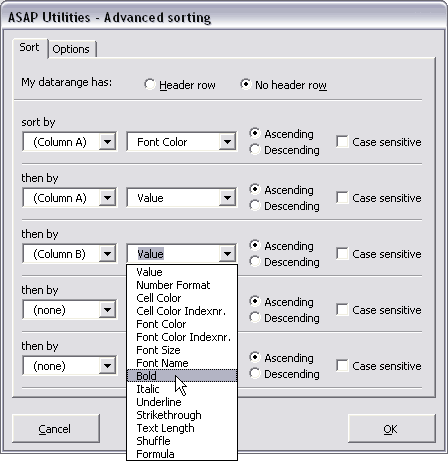
New menu with the shortcuts visible you assigned: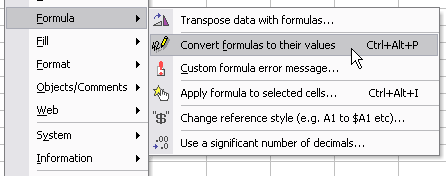
Apply formula with a history: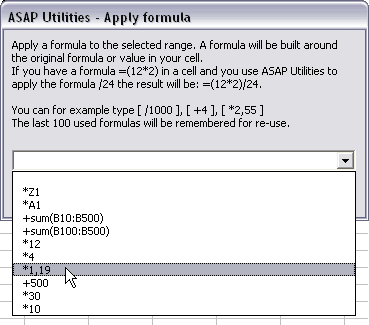
A new option to switch on/off the question that sometimes is asked before running the utility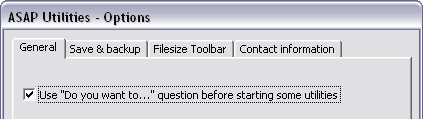
More utilities can be undone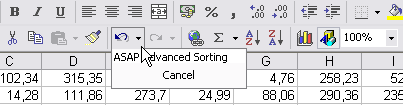
Protect all (selected) sheets improved: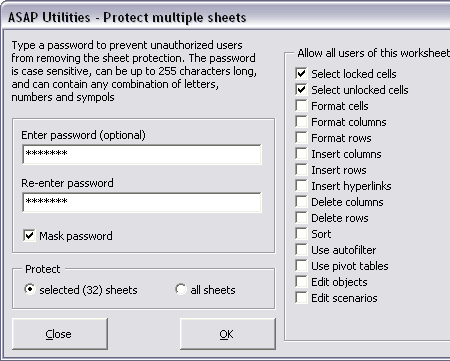
Export worksheets a separate files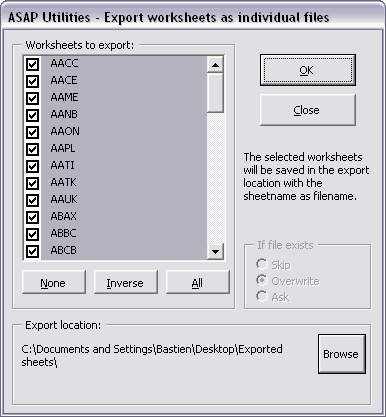
Improved progress indicators:
Installation notice
You must be logged in as an administrator or as a member of the Power Users group when installing ASAP Utilities. When the installation is finished every user on the computer is able to use ASAP Utilities.
Installation is easy. Best way is to make a backup of the current files in the ASAP Utilities folder and then run the installation.
If you have a previous version of ASAP Utilities installed, select that folder (the setup-program should detect it though), usually this is “C:\Program Files\ASAP Utilities\”. If you are not sure about that location you can see it in ASAP Utilities. Start Excel and then:
ASAP Utilities » ASAP » Options
More information about the installation.
Stay informed about new releases and important updates
Subscribe to our newsletter (in English)